Dell Precision 5690 Review: Worth It?
Dell Precision 5690 review: specs, performance, battery life, and pricing compared to rivals like the Lenovo Yoga Book 9. Is it worth buying?
 uaetechdubai
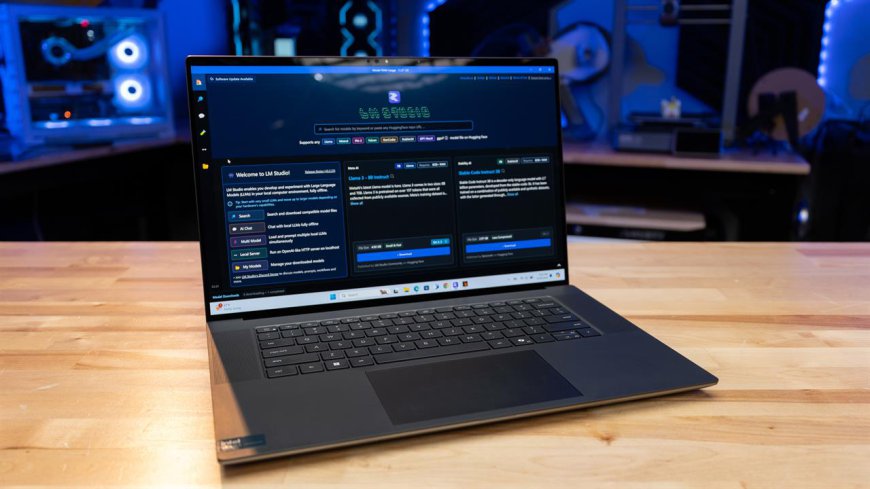
If you've spent any time shopping for a mobile workstation in 2025 and 2026, chances are the Dell Precision 5690 has landed on your shortlist. It's marketed as Dell's smallest-footprint 16-inch mobile workstation, and it's built for professionals who need serious horsepower CAD engineers, video editors, data scientists, and 3D artists without lugging around a brick.
In this article, you'll learn exactly what the Dell Precision 5690 offers in terms of performance, display quality, battery life, and build quality, how it stacks up against alternatives like the Lenovo Yoga Book 9 and the Dell Latitude 7350, and whether it's the right investment for your workflow. We'll also cover real-world testing data, pros and cons, and answers to the most common questions buyers ask before pulling the trigger.
What Is the Dell Precision 5690?
The Dell Precision 5690 is part of Dell's Precision mobile workstation lineup, sitting in the 16-inch category alongside machines built for compute-heavy professional tasks. It succeeds the Precision 5680, carrying forward the same XPS-inspired chassis design while swapping in Intel's newer Core Ultra "Meteor Lake-H" processors with a built-in Neural Processing Unit (NPU) that Intel brands as AI Boost.
Unlike consumer ultrabooks, the 5690 is ISV-certified for professional software like AutoCAD, SolidWorks, and Adobe's creative suite, and it's built to handle sustained workloads rather than short bursts of performance.
Key Specifications
-
Processor options: Intel Core Ultra 5 135H up to Core Ultra 9 185H (16 cores, 22 threads, up to 5.1GHz, 45W)
-
Graphics: Ranges from integrated Intel Arc Pro graphics to the NVIDIA RTX 5000 Ada Generation with 16GB of dedicated VRAM
-
Memory: Soldered LPDDR5-7467, up to 64GB (not user-upgradeable)
-
Storage: Two Gen4 M.2 2280 slots
-
Display: Choice of a 1920×1200 IPS panel or a stunning 3840×2400 OLED touchscreen with wide color coverage
-
Connectivity: Intel Wi-Fi 7 (BE200) with Bluetooth 5.4
-
Build: Aluminum frame with a glass-fiber-reinforced polycarbonate palm rest, MIL-STD 810H tested for shock, vibration, and temperature extremes
-
Weight: Around 2.03 kg, which is genuinely compact for a 16-inch workstation
Performance: How Does It Handle Real Work?
The headline configuration pairs the 45W Core Ultra 9 185H with the RTX 5000 Ada GPU, and reviewers have consistently praised the resulting performance for demanding creative and engineering workloads. In hands-on testing, this configuration handled 3D modeling, animation rendering, engineering simulations, and data science workloads without breaking a sweat, earning an Editors' Choice recommendation for delivering elite performance in a chassis this size.
That said, the 5690 isn't without limits. Some reviewers noted slight thermal throttling under extreme, sustained loads a common trade-off when a workstation this powerful is squeezed into a relatively thin chassis. It's also worth noting that Dell's base configuration, which ships with integrated graphics only, doesn't really qualify as a "workstation" in the traditional sense you'll want at least a mid-tier Ada GPU to unlock the machine's real potential.
Display Quality
The optional 4K (3840×2400) OLED touchscreen is one of the standout features of the 5690. It delivers 100% sRGB and roughly 98% DCI-P3 color coverage, wide viewing angles, and peak brightness above 500 nits — genuinely excellent numbers for colour-critical work like video editing or photo retouching.
Battery Life and Portability
Despite the powerful internals, testers clocked close to 11 hours of battery life on the OLED configuration, which is impressive for a machine in this performance class. Combined with its sub-2.1kg weight, the 5690 manages to feel far more portable than most 16-inch workstations on the market.

How Does It Compare to the Competition?
Buyers cross-shopping the Precision 5690 often land on very different device categories depending on what they actually need it for. Two worth understanding:
Dell Precision 5690 vs. Lenovo Yoga Book 9
The Lenovo Yoga Book 9 is a completely different animal it's a dual-screen 2-in-1 built around two 13.3 or 14-inch OLED panels rather than raw workstation power. It's designed for multitaskers who want screen real estate and flexibility (running a video call on one display while presenting slides on the other, for example), and it uses far more modest U-series or H-series Intel chips without any dedicated professional GPU option.
If your priority is CAD rendering, 3D modeling, or GPU-accelerated video work, the Precision 5690 is in an entirely different league. But if your workflow is about multitasking, note-taking, and portability rather than raw compute, the Yoga Book 9's dual-screen format solves a problem the 5690 was never designed to address. They're not really direct competitors think of the Yoga Book 9 as a productivity and creativity tool, and the 5690 as a compute tool.
Dell Precision 5690 vs. Dell Latitude 7350
The Dell Latitude 7350 Detachable is Dell's own 13-inch business tablet, built around lower-power Core Ultra U-series chips, integrated graphics, and a detachable keyboard. It's thinner, lighter, and considerably cheaper than the 5690, and it's aimed at road warriors who need long battery life and portability rather than rendering power.
Comparing the two really comes down to use case: the Latitude 7350 is for professionals whose "heavy lifting" is email, documents, and video calls between meetings, while the Precision 5690 is for professionals whose heavy lifting is, quite literally, heavy computational lifting.
Real-World Use Case: Who Actually Buys This Machine?
Consider a freelance architectural visualizer who needs to run SolidWorks and render photorealistic walkthroughs on-site for client presentations. A machine like the Latitude 7350 wouldn't have the GPU horsepower to handle real-time rendering, and a dual-screen device like the Yoga Book 9 wouldn't offer ISV certification for CAD software. The Precision 5690, configured with the RTX 5000 Ada GPU, is built precisely for this scenario enough graphics power to preview complex 3D scenes on location, paired with a portable chassis that doesn't require a dedicated bag just for the laptop.
Similarly, video editors working in color-graded 4K timelines benefit directly from the OLED display's wide color gamut, meaning less reliance on an external reference monitor while traveling.
Pros and Cons
Pros:
-
Genuinely compact and light for a 16-inch workstation
-
Excellent color-accurate OLED display option
-
Strong sustained performance from Core Ultra 9 + RTX Ada combination
-
Long battery life for a workstation-class device
-
Durable, MIL-STD-tested build quality
Cons:
-
Memory is soldered and not upgradeable after purchase
-
Fully configured units get very expensive
-
Some thermal throttling under extreme sustained loads
-
Base configuration with integrated graphics isn't a true workstation
Frequently Asked Questions
Is the Dell Precision 5690 good for gaming? It's not designed for gaming, though the higher-end RTX Ada GPU configurations can handle games reasonably well. You're paying a premium for professional certifications and drivers rather than gaming-tuned performance.
Can I upgrade the RAM later? No. The memory is soldered directly to the board, so it's important to choose your RAM configuration (16GB, 32GB, or 64GB) carefully at the time of purchase.
Is the OLED display worth the upgrade? For anyone doing color-sensitive work photo, video, or design yes. The color accuracy and brightness are a genuine step up from the standard IPS panel.
How does it compare in price to the Lenovo Yoga Book 9? The Precision 5690 typically costs significantly more once configured with a professional GPU, since it's targeting a completely different market segment than the consumer-focused Yoga Book 9.
Final Verdict
The Dell Precision 5690 earns its place as one of the most capable compact mobile workstations available today. It successfully balances serious professional-grade performance with a chassis that doesn't feel like it belongs in a suitcase rather than a backpack. It's not for everyone casual users and multitaskers are better served by devices like the Lenovo Yoga Book 9, and road warriors who just need portability should look at something like the Dell Latitude 7350 but for CAD professionals, engineers, and creatives who need real GPU power on the go, the 5690 delivers.
Have you used the Dell Precision 5690 for your own workflow, or are you deciding between it and another mobile workstation? Share your experience in the comments below, and don't forget to share this article with a colleague who's shopping for their next professional laptop.