Lenovo Carbon X1: Gen 14 Aura Edition Review
Lenovo Carbon X1 (ThinkPad X1 Carbon Gen 14 Aura Edition) review: specs, battery life, price, and how it compares to rivals like the Galaxy Book6.
 uaetechdubai
Introduction
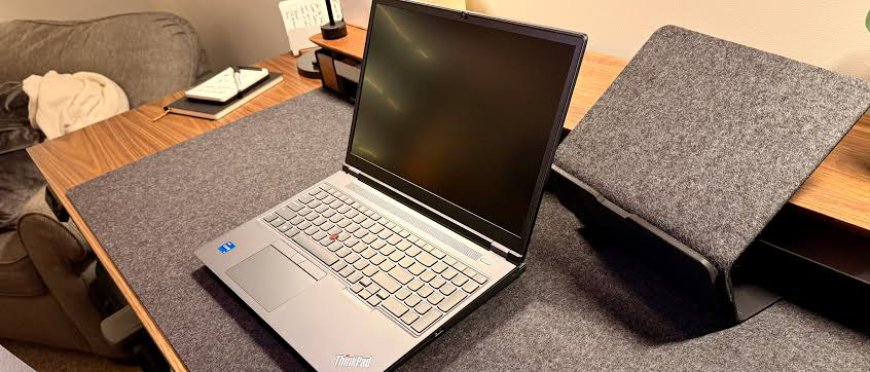
If you've been shopping for a business laptop lately, chances are you've run into the name "Lenovo Carbon X1" shorthand that many buyers use for the ThinkPad X1 Carbon, Lenovo's flagship ultraportable for professionals. The newest version, officially called the Lenovo ThinkPad X1 Carbon Gen 14 Aura Edition, launched in 2026 with a redesigned chassis, Intel's latest "Panther Lake" processors, and a battery life upgrade that finally fixes the previous generation's biggest complaint.
In this guide, you'll learn exactly what's new in the Gen 14 Aura Edition, how it performs in real-world use, what it costs, and how it stacks up against competitors like the Samsung Galaxy Book6. Whether you're an IT manager outfitting a fleet of laptops or an individual professional deciding where to spend your budget, this article breaks down everything you need to know before you buy.
What Is the Lenovo Carbon X1 (ThinkPad X1 Carbon Gen 14 Aura Edition)?
The ThinkPad X1 Carbon has been Lenovo's premium business laptop for over a decade, prized for its light weight, durable build, and best-in-class keyboard. The Gen 14 Aura Edition is the latest entry in that lineage, and it represents one of the most significant redesigns the series has seen in years.
<br>
Rather than a modest spec bump, Lenovo rebuilt the internal chassis from the ground up. The result is a laptop that's easier to repair, runs cooler, and according to early reviewers finally delivers the all-day battery life that road warriors have been asking for.
Key Features of the Lenovo ThinkPad X1 Carbon Gen 14 Aura Edition
A Redesigned "Space Frame" Chassis
The headline engineering change is what Lenovo calls the Space Frame chassis. It uses a double-sided printed circuit board that's about 20% smaller than before, freeing up internal space. Lenovo used that extra room to install a cooling fan that's roughly 70% larger, which helps the laptop sustain higher performance for longer without overheating.
Despite the internal overhaul, the laptop remains remarkably light still under 1kg (about 2.15 pounds) and it's built from a mix of carbon fiber and magnesium, consistent with the "Carbon" name. The design also earned an impressive repairability score, meaning components like the keyboard, battery, and sub-board parts can be swapped or upgraded more easily than on most ultraportables.
Intel Panther Lake Performance
Under the hood, the Gen 14 Aura Edition runs on Intel's latest Core Ultra "Panther Lake" processors, with configurations ranging from the Core Ultra 5 335 up to vPro-enabled Core Ultra 7 options. These chips pair performance and efficiency cores with an integrated NPU rated at roughly 49 TOPS, qualifying the laptop as a Copilot+ PC with on-device AI capabilities.
Buyers can configure the laptop with 16GB, 32GB, or 64GB of soldered LPDDR5X memory, and storage options span 256GB to 1TB of PCIe Gen4 SSD storage. It's worth noting the RAM is soldered and not user-upgradeable after purchase — a tradeoff for the thin, light design.
Display Options
Lenovo offers five display configurations on the Gen 14 Aura Edition, all at a 14-inch, 16:10 aspect ratio. Choices range from a Full HD+ (1920 x 1200) IPS panel to a sharper 2.8K (2880 x 1800) OLED option, with touch and non-touch variants available. Reviewers have praised the OLED panel in particular for its contrast and color accuracy, along with support for a 120Hz refresh rate on select configurations.
Battery Life That Finally Delivers
Previous X1 Carbon generations were dinged for merely average battery life. That appears to have changed. Reviewers testing the Gen 14 Aura Edition have reported routinely getting five to eight hours of screen-on time under mixed productivity workloads, with some describing it as leaving the charger at home without worry. The laptop uses a 58-watt-hour battery paired with a 65W USB-C GaN charger capable of an 80% charge in about an hour.
Ports and Connectivity
Despite its slim profile, the laptop keeps a generous port selection: a full-size HDMI 2.1 port, three Thunderbolt 4/USB4 Type-C ports (split across both sides), a full-size USB Type-A port, a headphone/microphone combo jack, and an optional nano SIM slot for 5G connectivity. Having Thunderbolt ports on both sides is a small but genuinely useful touch for plugging in a charger or dock from either direction.
Camera, Audio, and AI Features
The Gen 14 Aura Edition steps up its video conferencing game with camera options up to 10MP featuring a wider field of view and AI-enhanced image processing, along with dual far-field microphones and AI noise cancellation. The "Aura Edition" branding also brings software extras: tap-to-pair Bluetooth connectivity, context-aware "Smart Modes" that automatically adjust performance and security settings based on your workload, and Windows Hello Enhanced Sign-in Security via both facial recognition and a power-button fingerprint reader.
Enterprise Security
As with every ThinkPad, the X1 Carbon Gen 14 ships with Lenovo's ThinkShield security suite, covering hardware, software, and supply-chain protections, plus support for Intel vPro manageability features important considerations for IT departments deploying the laptop at scale.
Real-World Performance: What Reviewers Are Saying
Independent reviews of the Gen 14 Aura Edition have been largely positive. Tom's Hardware called it a masterclass in mobility and usability, highlighting its lightweight, sturdy build, and complete port selection as reasons it remains one of the most well-rounded ultraportables on the market. XDA Developers echoed that sentiment, noting the redesigned chassis resolves the battery life shortcomings of earlier models while keeping the keyboard and screen quality that made the series famous. Even in casual use cases like light gaming, testers found the integrated graphics handled less demanding titles at playable frame rates — a pleasant surprise for a business-first machine.
The consistent theme across reviews: this is not a dramatic reinvention, but a refinement of an already excellent formula, with the battery life and repairability improvements being the standout upgrades.
Pricing: How Much Does the Lenovo Carbon X1 Cost?
Pricing varies by configuration, but based on Lenovo's US listings and independent reviews:
-
Entry-level configuration (Core Ultra 5 335, 256GB SSD, Full HD+ display): around $2,000–$2,032
-
Mid-range configuration (Core Ultra 7 355, 512GB SSD, 2.8K OLED display, 32GB RAM): roughly $2,200–$2,300
-
Maxed-out configuration: can exceed $3,200
As with most Lenovo products, list prices fluctuate frequently due to ongoing promotions, so it's worth checking current deals before purchasing.
Lenovo Carbon X1 vs. Samsung Galaxy Book6
For buyers weighing options beyond the ThinkPad ecosystem, the Samsung Galaxy Book6 is one of the more natural comparisons in 2026, since both laptops launched around the same time on similar Intel Panther Lake silicon.
The Galaxy Book6 leans more toward a mainstream productivity and multimedia audience, with a 16-inch touchscreen, Galaxy AI integration, and deep ecosystem ties to Samsung phones and tablets features like Multi Control and Second Screen let you work fluidly across a Galaxy Book and a Galaxy Tab or phone. Higher-tier Galaxy Book6 Pro and Ultra models add discrete NVIDIA GPUs, making them more capable for creative and light gaming workloads than the ThinkPad's integrated graphics.
The Lenovo Carbon X1, by contrast, is built specifically for business use: it's lighter, more repairable, backed by enterprise-grade ThinkShield security, and designed for IT fleet management with vPro support. If your priority is portability, durability, and manageability across an organization, the ThinkPad wins. If you want a bigger screen, ecosystem integration with Samsung devices, and optional discrete graphics for creative work, the Galaxy Book6 is the stronger fit.
Pros and Cons
Pros:
-
Under 1kg despite a full redesign genuinely easy to carry all day
-
Significantly improved battery life over the previous generation
-
Excellent repairability and upgradeable components (rare for an ultraportable)
-
Sharp, optional 2.8K OLED display with 120Hz refresh rate
-
Thunderbolt 4 ports on both sides plus full-size HDMI and USB-A
-
Enterprise-grade ThinkShield security and vPro manageability
Cons:
-
Premium pricing, especially on higher-end configurations
-
RAM is soldered and cannot be upgraded after purchase
-
Integrated graphics only not suited for gaming or GPU-heavy creative work
-
Chassis flex noted by some reviewers, despite a very rigid lid
Frequently Asked Questions
Is the Lenovo Carbon X1 the same as the ThinkPad X1 Carbon? Yes. "Lenovo Carbon X1" is a common shorthand many people search for the ThinkPad X1 Carbon line. The current model is officially named the ThinkPad X1 Carbon Gen 14 Aura Edition.
What processor does the Gen 14 Aura Edition use? It uses Intel's latest Core Ultra "Panther Lake" processors, with options ranging from the Core Ultra 5 335 up to vPro-enabled Core Ultra 7 models.
How long does the battery last? Reviewers report roughly five to eight hours of screen-on time under mixed productivity use, a notable improvement over the previous generation.
Is the RAM or storage upgradeable? Storage uses a replaceable M.2 SSD, but RAM is soldered at the time of purchase and cannot be upgraded later, so it's worth choosing your memory configuration carefully upfront.
How does it compare to the Samsung Galaxy Book6? The ThinkPad X1 Carbon focuses on portability, security, and business manageability, while the Galaxy Book6 offers a larger screen, optional discrete graphics, and deeper integration with Samsung's device ecosystem.
Conclusion
The Lenovo ThinkPad X1 Carbon Gen 14 Aura Edition the laptop most people mean when they search for "Lenovo Carbon X1" is a genuinely strong refresh of an already respected business laptop line. The redesigned Space Frame chassis solves the model's longstanding battery life weakness, the build remains impressively light and durable, and the repairability improvements make it a smart long-term investment for both individuals and IT departments. It isn't cheap, and the soldered RAM is a real limitation, but for professionals who need a dependable, secure, and highly portable machine, it's hard to find a more complete package right now.
Thinking about upgrading your work laptop? Share this article with a colleague who's shopping for a new business machine, or drop a comment below with the configuration you're considering we'd love to hear which specs matter most to you.