A Step-by-Step Look at How a Foundation to QuickBooks Conversion Actually Works
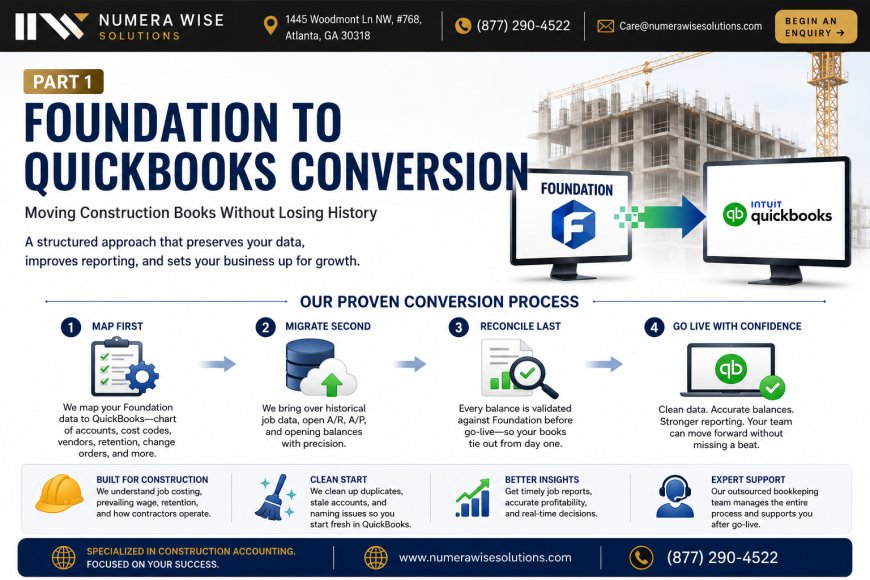
Migrating accounting systems feels risky because it usually is. One wrong mapping and your opening balances never tie out; miss a job reference and your project reports read like fiction. That fear keeps a lot of construction firms on Foundation long after they've outgrown it. The truth is that a Foundation to QuickBooks conversion is very manageable when it follows a disciplined sequence. Here's the process we use. Step 1: Scope and export checklist. Before anything moves, we document what needs to come across — chart of accounts, customers, vendors, jobs, open AR and AP, retention, and historical job costing. A clear checklist means nothing gets forgotten mid-migration. Step 2: Chart-of-accounts mapping. We build a crosswalk between the Foundation accounts and a clean QuickBooks structure, merging duplicates and retiring dormant accounts along the way. Migrating a tidy chart is far easier than fixing one later. Step 3: Job and cost-code mapping. This is the construction-specific heart of the project. We decide how Foundation's cost codes, phases, and committed costs map to QuickBooks items and classes, so job costing survives the move with its detail intact. Step 4: Data migration. With the mapping locked, we bring the data across in a controlled way — masters first, then open transactions, then balances. Structuring the data migration in the right order avoids orphaned records and broken links. Step 5: Opening balance validation. Every account gets tied back to the Foundation trial balance on the conversion date. We validate the full balance sheet line by line before anyone works in the new system, so the first close is clean. Step 6: Parallel check and go-live. We compare key reports — AR aging, AP aging, job cost summaries — between the two systems to confirm they agree. Once they do, the business goes live in QuickBooks with confidence. Step 7: Post-go-live support. The first month is where questions surface, so we stay involved through the first close to resolve anything that comes up. A few things make or break the outcome. Reconcile before you migrate, not after — old problems are much harder to untangle once they're layered into a new system. Preserve cost-code detail, because flattening it defeats the purpose of the move for a contractor. And don't rush the opening balances; that's the one area where a shortcut always comes back around. Handled this way, the conversion delivers exactly what firms switch for: real-time job costing, faster month-ends, and reporting that scales with the business. The historical detail carries over, the books tie out, and the team isn't stuck cleaning up for a quarter. If your firm is weighing a Foundation to QuickBooks conversion and wants it done without the drama, a specialist bookkeeping services partner can run the whole sequence for you — from export checklist to a clean first close.
 Numerawise
0
1