Universal 3D Printer Enclosures Explained: What They Are and How They Work
Discover how a universal 3D printer enclosure improves print quality, reduces noise, controls fumes, and supports multiple printer models for long-term value.
 adam57
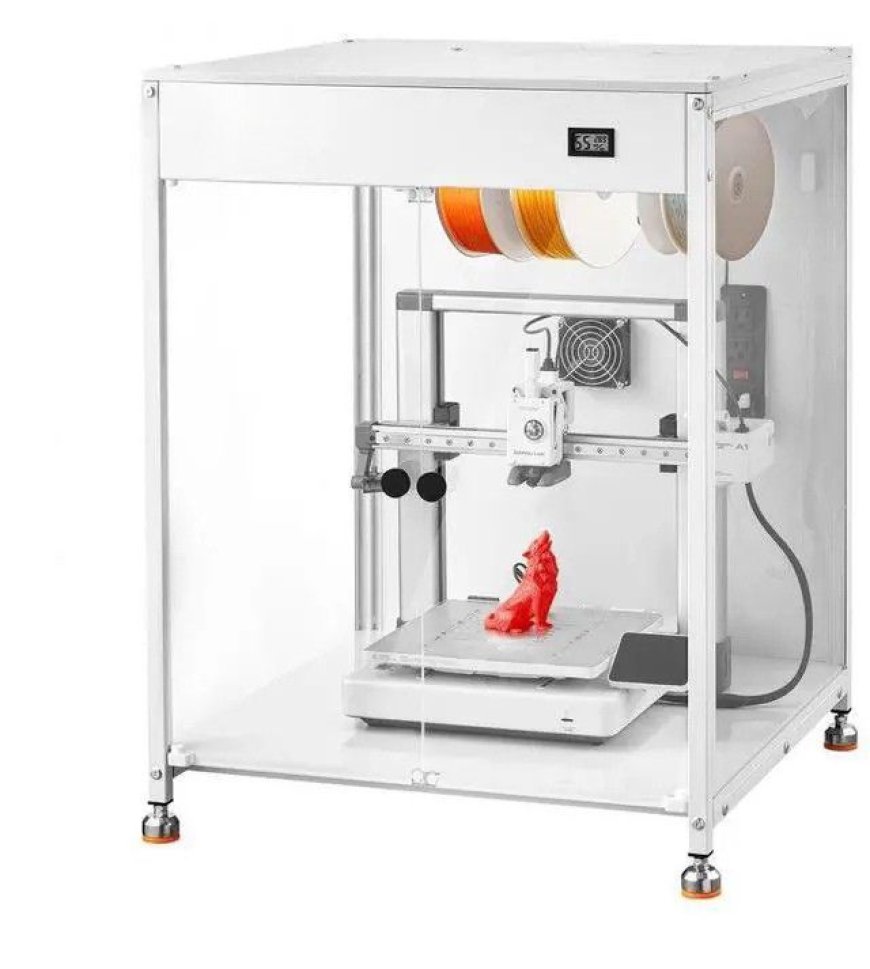
You've upgraded your hotend, dialed in your slicer settings, and spent hours calibrating your bed. Yet your prints still warp, crack, or come out inconsistent. The culprit is often something that most makers overlook entirely: the environment surrounding the printer.
A universal 3D printer enclosure solves this problem without locking you into a single machine. It's one of the most practical upgrades you can make, whether you own one printer or five.
What Is a Universal 3D Printer Enclosure?
A universal enclosure is a housing unit designed to fit a wide range of printer models rather than one specific machine. Unlike manufacturer-specific enclosures built for a single brand or model, universal options accommodate different footprints, heights, and configurations through adjustable frames, modular panels, or flexible sizing.
They create a controlled thermal chamber around your printer, trapping heat, blocking drafts, reducing noise, and containing the fumes and particles produced by FDM printing.
What Makes an Enclosure "Universal"?
Not every enclosure earns the label. A truly universal design includes:
-
Adjustable or scalable dimensions — fits compact machines like the Ender 3 and larger ones like the CR-10 or Bambu Lab X1
-
Flexible entry points — accommodate different filament feed paths, power cable positions, and USB ports
-
Modular panel system — allows you to add, remove, or reposition walls based on your printer's layout
-
Broad weight and size tolerance — supports various printer weights without compromising structural stability
If you switch printers down the line, a well-designed universal enclosure moves with you.
How Does a Universal 3D Printer Enclosure Work?
The core function is environmental control. Here's what happens inside once you close the panels:
1. Heat Retention
The enclosure traps the warmth generated by the heated bed and hotend, raising the ambient temperature inside the chamber. This is critical for materials like ABS, ASA, and Nylon, which require a consistently warm environment to bond between layers and cool evenly without warping or cracking.
Most rigid enclosures maintain chamber temperatures of 40–55°C during a print, enough to make a significant difference in layer adhesion and dimensional accuracy.
2. Draft Elimination
Even gentle airflow from an open window, a fan, or an air conditioning vent can cause uneven cooling on tall or thin prints. The enclosure acts as a physical barrier, isolating the print environment from ambient airflow and maintaining stable surface temperatures throughout the build.
3. Noise Dampening
Stepper motors, cooling fans, and frame vibration all contribute to the operational noise of a running printer. Enclosure walls, especially those with foam lining or double-panel construction, absorb and diffuse that sound, reducing noise output by 5–15 dB depending on build quality.
4. Fume and Particle Containment
FDM printing releases ultrafine particles and volatile organic compounds (VOCs), particularly when printing ABS, PETG, or specialty filaments. A sealed or semi-sealed housing concentrates these emissions so they can be captured by an integrated carbon or HEPA filter rather than dispersing freely into your workspace.
Who Should Use One?
A multi-printer compatible enclosure makes the most sense if you:
-
Print with engineering filaments like ABS, ASA, Nylon, or polycarbonate that demand thermal stability
-
Own or plan to own multiple printers and want one housing solution that works across all of them
-
Print in shared spaces — home offices, bedrooms, or studios, where noise and air quality matter
-
Upgrade printers regularly, and don't want to rebuy enclosures each time
-
Run long unattended prints where a stable, controlled environment reduces failure risk
PLA-only users printing in a stable room may not see dramatic gains in quality, but they'll still benefit from noise reduction and dust protection.
Key Features to Look for
Not all universal enclosures deliver equal performance. Prioritize these when comparing options:
-
Rigid panel construction — acrylic or polycarbonate retains heat far better than fabric walls
-
Transparent front panel — monitor prints without breaking the thermal seal
-
Built-in or compatible filtration — HEPA and activated carbon filters for VOC and particle management
-
Cable and filament pass-throughs — keep wiring tidy and prevent heat loss at entry points
-
Tool-free assembly — modular designs that adjust without drilling or permanent modification
-
Fire-resistant materials — essential for long unattended print sessions
Universal vs. Printer-Specific Enclosures
|
Factor |
Universal |
Printer-Specific |
|
Compatibility |
Multiple printers |
One model only |
|
Cost efficiency |
Higher long-term value |
Lower upfront cost |
|
Fit precision |
Adjustable, approximate |
Perfect fit |
|
Future-proofing |
Moves with your setup |
Becomes obsolete on upgrade |
|
Availability |
Widely available |
Limited to the manufacturer |
For makers who upgrade regularly or run mixed fleets, the universal option almost always wins in terms of total value.
Conclusion
A universal 3D printer enclosure does more than box in your machine; it provides your printer with a controlled, consistent environment to work in, regardless of what's happening in the room around it. Better heat retention, cleaner air, quieter operation, and fewer failed prints all follow from that one change.
If you're serious about print quality and want a housing solution that grows with your setup, a well-built universal enclosure is one of the smartest investments on your workbench.