

Canva Pro Cost Explained: Is the Upgrade Worth Your Money?
How much is Canva Pro? Learn about Canva Pro pricing, features, Free vs Pro differences, AI tools, premium content, and what you get when you upgrade.

If you use Canva often, you have probably seen the small crown icon on certain templates, photos, graphics, fonts, and other design elements. Some features are available only after upgrading to Canva Pro, which naturally leads to one common question: How much is Canva Pro, and is it worth paying for?
The answer depends on how you use Canva.
Someone who creates an occasional social media post may have everything they need with the free plan. On the other hand, a person who creates designs every day may find premium content, background removal, brand tools, cloud storage, and AI features useful.
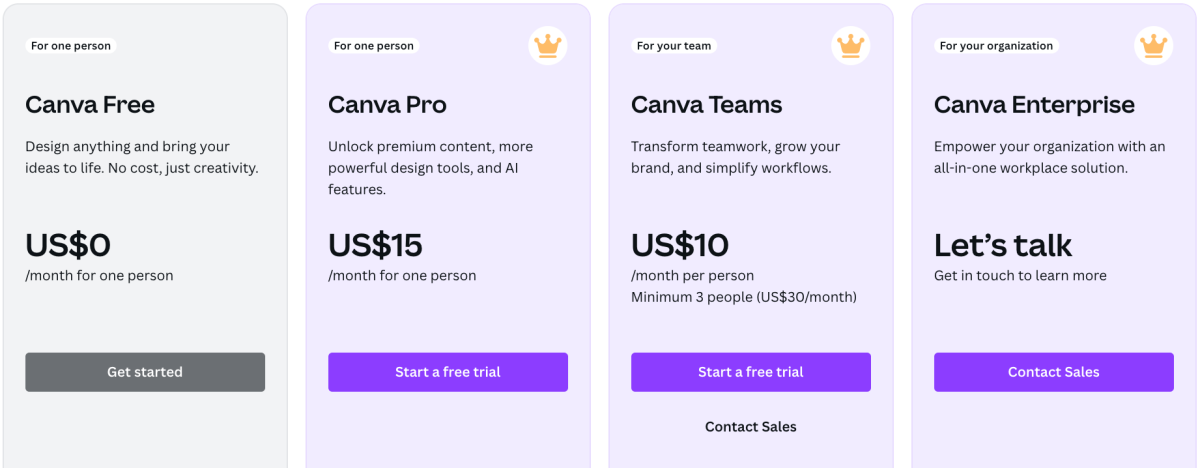
Canva currently lists its Pro plan at US$180 per year for one person on its official pricing page. Canva also states that prices can vary by location and that applicable taxes may be added.
Before deciding whether to upgrade, it helps to understand exactly what Canva Pro includes and how it differs from Canva Free.
How Much Is Canva Pro?
So, how much is Canva Pro?
At the time of writing, Canva's official pricing page lists Canva Pro at US$180 per year for one person. The pricing page also shows a free plan at US$0 per year and a separate Business plan for users who need additional business and team features.
However, the amount you see when you sign up can depend on your country, billing details, taxes, and the plan or billing option available to you. Canva's terms explain that pricing can vary by location and that applicable taxes are calculated based on billing information.
For that reason, it is a good idea to check the current Canva pricing page before making a payment.
The important point is that Canva Pro is a paid individual subscription. It is designed for people who want access to more premium content, design tools, AI features, and storage than the Free plan provides.
What Do You Get With Canva Free?
Before looking at Pro, it is important to understand what you already get without paying.
Canva Free allows individuals to create designs without a subscription fee. Canva currently lists features such as its drag-and-drop editor, more than 1,000 design types, more than 1.6 million templates, millions of photos, videos, graphics, and audio files, 5GB of cloud storage, and access to some AI usage.
That is a lot for a free design platform.
You can use the free plan for many common tasks, including:
-
Social media graphics
-
Presentations
-
Posters
-
Flyers
-
Simple logos
-
Pinterest graphics
-
Basic videos
-
Documents
-
Classroom materials
-
Personal projects
-
Simple marketing designs
If you only design occasionally, the free plan may cover most of your needs.
The main limitation appears when you regularly want premium content or advanced tools.
What Is Canva Pro?
Canva Pro is the paid individual plan that adds premium content, additional design features, AI capabilities, brand tools, and more storage.
According to Canva's current pricing information, Pro includes more than 3.6 million templates, more than 141 million premium photos, videos, graphics, and audio files, five Brand Kits, social content scheduling, 100GB of cloud storage, and expanded AI usage.
Canva's Pro page also highlights premium content and AI-powered features designed to help users create and manage visual content more efficiently.
This means Pro is not simply about getting more templates. It can also reduce the number of separate steps you need to take while designing.
Canva Free vs Pro: What Is the Difference?
The biggest difference between Canva Free and Pro is access.
With Canva Free, you can create many types of designs using free content and tools. With Pro, you unlock a much larger premium library and additional features.
Here is a simple comparison:
| Feature | Canva Free | Canva Pro |
|---|---|---|
| Basic design editor | Yes | Yes |
| Free templates | Yes | Yes |
| Premium templates | Limited | Yes |
| Premium photos and graphics | Limited | Yes |
| Cloud storage | 5GB | 100GB |
| Brand Kits | 1 limited kit | 5 Brand Kits |
| Background removal tools | Limited | Yes |
| Premium AI tools | Limited | Expanded access |
| Social content scheduling | — | Yes |
| Premium fonts and design assets | Limited | Yes |
Canva's current pricing page confirms these plan differences and notes that each paid plan includes the features of the previous plan plus additional capabilities.
Canva Pro Premium Content
One of the biggest reasons people consider upgrading is premium content.
Canva separates content into Free and Pro content. Free users can use free content without paying for it. When a design contains Pro content, Canva may display a watermark until the user purchases a license for that content or subscribes to Canva Pro.
For regular Canva users, this can make a noticeable difference.
Instead of searching through only free assets, Pro users can access a much larger collection of premium photos, videos, graphics, audio, templates, and other content.
This can be particularly useful when creating designs that need a specific visual style.
Background Remover and Photo Editing
Another useful Pro feature is background removal.
Removing a background manually can take time, especially when an image has complicated edges. Canva Pro provides a background removal tool that can help separate the main subject from its background.
This can be useful for:
-
Product images
-
Social media graphics
-
Profile pictures
-
Marketing materials
-
Etsy product visuals
-
Presentation graphics
-
Posters
-
Thumbnail designs
If you frequently work with images, saving time on repeated editing tasks can be one of the practical reasons to consider Pro.
Canva Pro AI Tools
AI is now another major part of Canva's paid plans.
Canva's current pricing page says Pro provides substantially more AI usage than the Free plan. It lists up to 200 uses of Premium AI tools or up to 20 uses of Ultra AI tools for Pro, while actual usage can vary depending on the type and complexity of the AI tool used.
Canva's Pro page also describes Pro as providing AI-powered tools for tasks such as content creation and design workflows.
For someone who creates designs frequently, these tools can help with repetitive creative tasks.
However, AI usage should not be the only reason to subscribe. The value depends on whether you actually use these features.
Brand Kits for Consistent Designs
Brand consistency becomes important when you create content for a business, website, social media account, or personal brand.
Canva Pro currently includes up to five Brand Kits.
A Brand Kit can help organize important brand elements such as:
-
Brand colors
-
Fonts
-
Logos
-
Other visual identity elements
Instead of repeatedly searching for the correct colors and fonts, you can keep important branding information together.
This can make regular content creation easier, especially when you create many designs with the same visual identity.
Is Canva Pro Useful for Etsy Sellers?
Canva is also commonly used to create digital products and marketing graphics for online stores.
If you are researching how to sell Canva templates on Etsy, premium design resources may become relevant to your workflow.
For example, you may use Canva to create:
-
Printable planners
-
Social media templates
-
Invitations
-
Worksheets
-
Checklists
-
Presentation templates
-
Marketing templates
-
Digital wall art
-
Business documents
However, anyone selling designs should understand Canva's licensing rules rather than assuming that every Canva element can simply be resold.
Canva explains that its content can be used in Canva designs for a range of personal and commercial purposes, but users should not resell, redistribute, or claim Canva-provided content itself as their own.
If you are planning to sell designs, always review the current licensing terms before publishing products.
Can You Use Canva Pro Elements for Commercial Designs?
This is an important question for creators.
Canva's licensing information states that Canva content can be used in designs for various personal and commercial uses, including marketing, social media, and merchandise. However, the content itself should not be resold, redistributed, or presented as your own standalone asset.
This difference matters.
For example, using a Canva element as part of a larger finished design is different from taking that element and trying to sell or redistribute it by itself.
Because licensing rules can change, check Canva's current licensing information whenever your project involves commercial use.
Canva Pro for Social Media Creators
If you manage social media accounts, Canva Pro can also be useful for producing content regularly.
You might create:
-
Instagram posts
-
Instagram carousels
-
Pinterest graphics
-
YouTube thumbnails
-
Facebook graphics
-
Promotional banners
-
Story designs
-
Short videos
The larger premium library can give you more design options, while scheduling features can help organize social content. Canva's current Pro plan includes social content scheduling.
For someone publishing several designs every week, these features may become more useful than they would for someone who creates one design every few months.
How Much Storage Does Canva Pro Include?
Storage is another difference between the plans.
Canva currently lists 5GB of cloud storage for Free users and 100GB for Pro users.
More storage can be helpful if you regularly upload:
-
Photos
-
Videos
-
Logos
-
Brand assets
-
Product images
-
Design files
-
Marketing materials
If your Canva account contains hundreds of projects and uploaded files, additional storage can make your workflow more convenient.
Do You Need Canva Pro?
Not everyone needs Canva Pro.
If you only make simple designs and are happy with the free templates and assets available to you, Canva Free may be enough.
You may want to consider Pro if you regularly:
-
Create designs for clients
-
Manage social media content
-
Create marketing materials
-
Sell digital products
-
Work with brand guidelines
-
Remove image backgrounds
-
Use premium templates
-
Need premium photos and graphics
-
Use Canva's AI tools frequently
-
Store many design assets
-
Create designs several times each week
The more frequently you use these features, the more relevant the subscription becomes to your workflow.
Is Canva Pro Worth the Money?
Instead of asking whether Canva Pro is universally worth it, it is better to ask whether its features solve problems you regularly have.
For example, imagine you create designs every day and repeatedly need premium photos, background removal, brand assets, and AI tools. Those features may save time compared with working without them.
Now imagine you create a birthday invitation twice a year. In that situation, paying for a yearly subscription may not provide the same practical value.
Your usage matters more than the label "Pro."
A simple way to think about it is:
Occasional designer → Canva Free may be enough.
Frequent designer → Pro features may become more useful.
Business or team user → You may need to compare Pro with Canva's other current plans.
This approach lets you choose based on your actual design needs rather than simply paying for features you may never use.
What About a Canva Review?
When reading a Canva review, it is easy to focus only on the number of templates or premium graphics available.
A more useful review should consider the entire workflow.
Ask yourself:
-
How often do I use Canva?
-
Do I need premium content?
-
Do I regularly remove image backgrounds?
-
Do I need brand tools?
-
Will I use AI features?
-
Do I need more cloud storage?
-
Do I create social media content regularly?
-
Do I sell or market digital products?
-
Will the features save me time?
-
Can I accomplish my current projects with Canva Free?
These questions can help you decide whether the additional features match your needs.
Where Can You Find More Canva Tips?
Canva has many features, and learning them gradually can make designing much easier.
If you are looking for more Canva design tips, tutorials, and useful resources, you can explore this Canva resource for additional ideas and guidance.
You can also learn specific skills such as how to outline text in Canva, how to curve text, how to add drop shadows, how to make a background transparent, and how to embed video in canva.
Small improvements can make a big difference when you use Canva regularly.
Final Thoughts
So, how much is Canva Pro?
Canva's current official pricing page lists the individual Pro plan at US$180 per year for one person, although the final price can vary by location and applicable taxes.
The Pro plan provides access to premium templates and content, expanded AI usage, additional storage, Brand Kits, social scheduling, and other features that are not available in the same way on Canva Free.
Whether you should upgrade depends on how often you design and which features you actually need.
For casual users, Canva Free may provide everything necessary for basic projects. For frequent creators, marketers, business owners, social media managers, and digital product creators, the additional Pro features may fit more naturally into a regular workflow.
Before subscribing, compare the current plan details and pricing for your location. Then consider your own design habits, the tools you use most, and whether the additional features justify the cost for your particular projects.





Comments (0)