

Digital Reception with Kiosk Visitor Management System in Kuwait


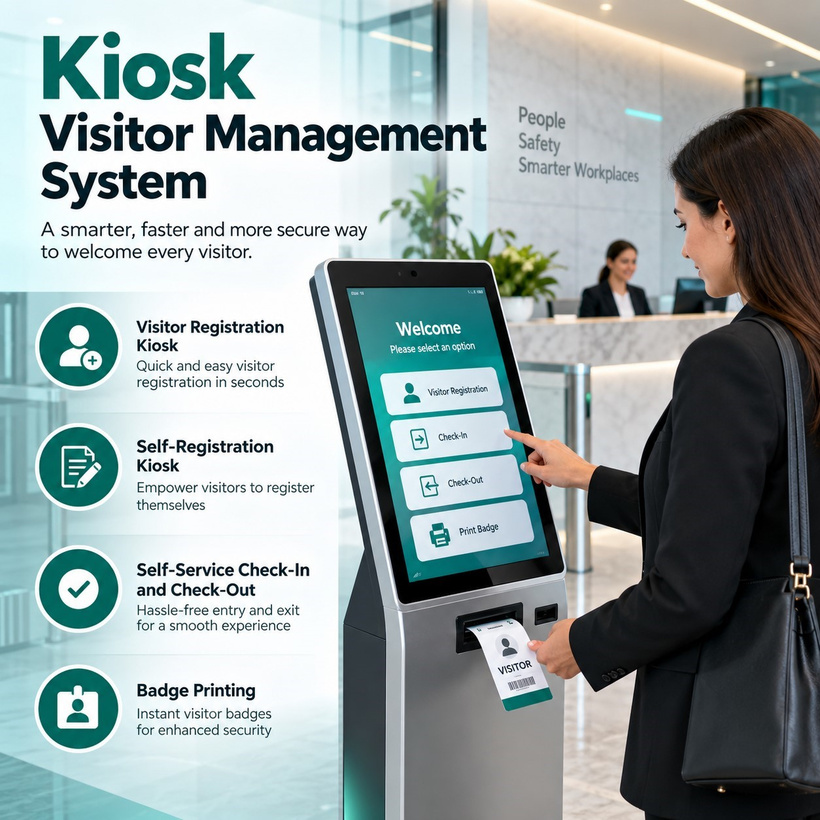
Kuwaiti offices, hospitals, factories, and government campuses are moving to digital reception with a Kiosk Visitor Management System that registers, verifies, and badges guests in seconds without a receptionist manually keying in every detail. As organizations across Kuwait face rising scrutiny over who is allowed inside their buildings, a fast, secure check-in process has become a genuine standard rather than a back-office convenience.
Why Kuwait's Workplaces Are Moving to Digital Reception
Reception areas across sectors as varied as commercial towers, hospitals, factories, and government campuses all face a specific set of pressures: peak-hour visitor surges need to clear quickly without compromising who is allowed further inside, operators need an auditable record of every guest for fire safety and security purposes, and visitors increasingly expect the same polished, self-service experience regardless of which industry they are walking into. A well-specified kiosk answers all three at once, provided it is configured to match the site's actual visitor volume and access requirements rather than a generic, one-size-fits-all setup.
Expedite IoT, brings direct, on-the-ground experience with the traffic patterns and compliance expectations typical of Gulf facilities across multiple sectors into every Kuwait project. That experience shapes how kiosk projects are specified today, as one component of an integrated entry strategy spanning registration, credentialing, and access control integration, rather than a standalone screen bolted onto a reception desk.
Understanding the Visitor Management System Kiosk Category
A Visitor Management System Kiosk combines guest-facing hardware, a touchscreen, camera, and badge printer, with backend software that stores visitor records, notifies hosts, and produces compliance reports, all working together rather than as separate, disconnected tools.
Hardware Versus Software: What Makes Up the Kiosk
The physical unit is only the visible layer. Behind it sits a database of expected visitors, host directories, watchlist screening rules, and reporting logic that determines how quickly and accurately a guest can be processed at the counter.
Where Kiosks Fit in the Visitor Journey
A kiosk typically sits at the exact point a paper logbook or manual sign-in sheet used to occupy, but extends the process both backward, into pre-registration before a guest arrives, and forward, into automated checkout and reporting after they leave.
Visitor Registration Kiosk Workflows for Corporate Lobbies
At the heart of the guest experience is the Visitor Registration Kiosk workflow, the sequence of screens and prompts a visitor moves through from arrival to a printed badge in hand.
Pre-Registration Versus Walk-In Registration
Pre-registered guests, invited in advance by their host, typically scan a QR code or enter a confirmation number to skip most manual data entry, while walk-in visitors complete a short-guided form directly at the kiosk, both paths converging on the same badge printing and host notification step.
Host Notification and Approval
The moment a visitor completes registration, the system automatically notifies their host by SMS or email, and in higher-security buildings can require explicit host approval before a badge is released, closing a gap that manual sign-in sheets never addressed.
Self-Registration Kiosk Design for Frictionless Front Desks
A well-designed Self-Registration Kiosk has to work for a first-time visitor who has never used the hardware before, guiding them through identification, purpose of visit, and host selection without requiring reception staff to intervene at every step.
Guided Screens for First-Time Visitors
Large touch targets, a visible progress indicator, and a single confirmation screen before a badge prints all reduce hesitation and mis-taps, which matter more in a busy corporate lobby than in an internal, staff-only application where users are already trained.
Multi-Language and Accessibility Support
Given the international visitor mix typical of Kuwaiti corporate towers, interfaces commonly rotate through English, Arabic, and several other languages, supporting guests who are more comfortable completing registration in their preferred language.
Self-Service Check-In and Check-Out for Full Visit Lifecycle Tracking
Registration is only half the picture. Self-Service Check-In and Check-Out tracks a guest's entire visit, from the moment they arrive to the moment they leave, giving building management an accurate, real-time occupancy count rather than a one-time entry log.
Check-in Data Capture and ID Verification
At check-in, the kiosk can capture a photo, scan an Emirates ID or passport, and record the visit purpose, all within a few seconds, replacing the handwritten entries that were often illegible or incomplete on paper logbooks.
Automated Checkout and Overstay Alerts
Guests can check out at the same kiosk or automatically when their badge expires, while overstay alerts flag any visitor still on-site well past their expected departure time, giving security teams a genuine reason to follow up rather than guessing at who remains in the building.
Badge Printing for Instant, Professional Visitor Credentials
The final, visible step in the kiosk workflow is Badge Printing, producing a physical credential a guest can wear for the duration of their visit, replacing the generic sticker labels or handwritten paper passes still common in older reception setups.
Photo Capture and Badge Design
Modern kiosks capture a guest's photo during registration and print it directly onto the badge alongside their name, host, and visit date, giving building security an easy way to visually match a badge to the person wearing it.
Expiring and Watermarked Badges for Security
Badges commonly include a color-shifting watermark that changes after a set number of hours, or an expiration date printed prominently, preventing a guest from reusing a badge from a previous visit or extending their stay beyond an approved window.
Selecting the Right Kiosk Platform for Your Tower
Choosing between competing kiosk platforms comes down to more than screen size or badge printer speed. Building owners should weigh integration depth, data governance practices, and a vendor's demonstrated experience with comparable multi-tenant deployments before committing to a specific system.
Integration with Access Control and Turnstiles
A kiosk that hands off directly to lobby turnstiles or elevator access control means a visitor's printed badge can also grant temporary passage through physical barriers, rather than requiring a separate manual step from security staff for every guest.
Data Privacy and Retention Settings
Administrators should be able to configure exactly how long visitor photos, ID scans, and visit records are retained, and who inside the organization can access that data, supporting both internal governance policy and any external regulatory expectations around personal data handling.
Industry Use Cases Across Every Kuwait Sector
Multi-Tenant Office Towers
Landlords use kiosks to manage a constant flow of visitors across dozens of tenant companies, giving building management a unified occupancy record without requiring every tenant to staff their own reception desk.
Banking and Financial Institutions
Financial firms often add host-approval requirements and watchlist screening to kiosk workflows for back-office and executive floor visitors, supporting the same auditable access standard applied elsewhere in their physical security policy.
Government and Semi-Government Offices
Ministries and government-linked entities favour kiosks with stricter ID verification and longer data retention settings, reflecting the more compliance-sensitive nature of visitor screening in these environments.
Healthcare Facilities
Hospitals and clinics use kiosks to register visitors against patient visiting schedules, printing time-limited badges that expire automatically at the end of visiting hours to support ward security.
Manufacturing and Industrial Sites
Factories and industrial facilities use kiosk registration to capture safety induction acknowledgments alongside standard visitor details, ensuring contractors and guests confirm they understand site safety rules before badge printing releases them onto the floor.
Educational Campuses
Universities and schools use kiosks to screen parents, contractors, and guest speakers against a host-approval workflow, keeping campus access controlled without slowing down legitimate visitor traffic during open days or events.
Business Parks and Free Zones
Multi-building business park campuses deploy a shared kiosk platform across several lobbies, giving visitors a consistent registration experience and giving security teams a single, unified visitor log across the entire development.
Compliance and Regional Regulatory Fit
Regulated facilities and master-developer communities across Kuwait increasingly expect documented proof of visitor screening, data retention policy, and fire-safety occupancy tracking rather than a paper sign-in sheet that can be incomplete or lost. A kiosk platform that produces exportable, timestamped visitor logs on demand puts a building in a far stronger position during a routine inspection or an unannounced audit than manual reception records ever could.
Total Cost of Ownership: Kiosks Versus Staffed Reception Desks
A fully staffed reception desk carries an ongoing payroll cost around the clock, along with the inconsistency that comes from shift changes and the practical limits of a receptionist manually processing dozens of unfamiliar visitors during a busy morning. A kiosk, once commissioned, replaces the bulk of that routine registration workload with a consistent, logged process, while still allowing a reduced front-desk presence for exceptions and host escalations. Facility teams comparing the two options typically find that automation pays back its installation cost within a reasonable period once reduced staffing hours and a stronger audit trail are factored into the calculation.
Regional Adoption: Kiosk Visitor Management Deployments Across Kuwait
Demand for a properly integrated Kiosk Visitor Management System Kuwait wide has grown alongside the country's continued commercial and government facility development, with new office buildings and public-sector campuses increasingly specifying self-service visitor registration at the design stage rather than retrofitting it later. Government-linked facilities frequently emphasize stricter host-approval workflows and longer data retention given the sensitivity of their visitor screening requirements, while commercial towers in Kuwait City tend to prioritize multi-language support and rapid throughput to suit a dense, internationally diverse tenant base.
Conclusion
Kuwaiti organizations upgrading workplace security increasingly specify a proven Kiosk Visitor Management System built around a reliable Visitor Management System Kiosk platform. A well-designed Visitor Registration Kiosk paired with a guided Self-Registration Kiosk experience keeps first-time guests moving without staff intervention. Complete Self-Service Check-In and Check-Out tracking, backed by instant Badge Printing, gives building management a full, auditable visit record. Businesses evaluating a Kiosk Visitor Management System Kuwait project can review the full lineup on Expedite IoT's kiosk visitor management service page.
FAQs
1. How long does it take a visitor to register at a kiosk?
A pre-registered guest can typically complete check-in in under thirty seconds by scanning a confirmation code, while a walk-in visitor completing a full registration form usually takes one to two minutes.
2. Can a kiosk system integrate with existing lobby turnstiles?
Yes, most modern platforms are built to hand off directly to turnstile or elevator access control systems, allowing a printed badge to also grant temporary physical access rather than requiring a separate manual step.
3. What happens to a visitor's photo and ID scan after their visit?
Retention settings are configurable by the building administrator, and properly configured systems allow data to be automatically purged after a defined period in line with the organization's data governance policy.
4. Can hosts approve visitors remotely rather than in person?
Yes. Most platforms send an automatic notification to the host's phone or email the moment a guest registers, allowing remote approval before a badge is released for higher-security buildings.
5. How many kiosks does a typical corporate tower lobby need?
Kiosk count depends on peak-hour visitor volume rather than total tenant headcount, since most visitor traffic concentrates around specific meeting times. A short visitor volume study during site assessment is the most reliable way to size kiosk count correctly.













Comments (0)