

Best Online Tool to Convert Mbps, Gbps, KB/s, and MB/s
Convert Mbps, Gbps, KB/s, and MB/s quickly with a free online data transfer converter. Get accurate results to compare internet speeds, estimate download times, and simplify everyday file transfer calculations.

Picture a Friday night. You’ve queued up a big game update, and your internet plan promises 300 Mbps. Yet the download window shows a number that looks tiny.
Before you blame your provider, take a breath. In most cases, the numbers are fine. They’re just speaking different languages.
Why Speed Units Feel Like a Puzzle
Internet plans are sold in bits per second. Downloads, files and storage are shown in bytes per second.
The labels look nearly the same on screen. Mbps, MB/s, Gbps and KB/s all share similar letters, and one capital changes everything.
That’s why so many people feel their connection is underperforming. In reality, they’re comparing two different scales.
Meet the Units: A Quick Tour
Bits and Bytes
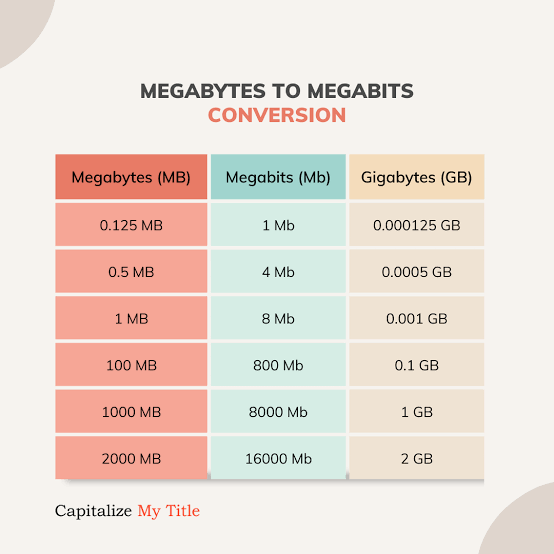
A bit is the smallest unit of digital data. A byte is made of 8 bits.
This single fact drives almost every conversion. Divide bits by 8 to get bytes, and multiply bytes by 8 to get bits.
Kbps, Mbps and Gbps
These measure speed in bits per second. Kbps means thousands of bits, Mbps means millions and Gbps means billions.
In networking, each step usually jumps by 1,000. So 1 Gbps equals 1,000 Mbps.
KB/s and MB/s
These measure speed in bytes per second. They are the numbers you often see in download managers, browsers and file transfers.
Converting between the two families is where most mistakes happen.
Why Fast Conversion Matters More Than Ever
Our connections are busier than they have ever been. Streaming, remote work, cloud backups and gaming all compete for bandwidth.
Ookla’s Speedtest Global Index has reported global median fixed broadband speeds above 90 Mbps in recent years. Speeds keep rising, which means the numbers you deal with keep getting bigger.
Demand is growing as well. Cisco has estimated that video makes up around 80 percent of global internet traffic, which shows how much data we move every day.
With bigger numbers and more devices, quick and accurate conversion is a real help.
What Makes a Great Online Converter?
It Handles Every Unit You Need
A good tool covers the full range, from KB/s up to Gbps. You shouldn’t need one site for bits and another for bytes.
It Gives Instant, Accurate Results
You enter a number, pick your units and get the answer right away. Accuracy matters most when you’re planning large downloads or comparing plans.
It’s Free and Simple
The best tools don’t ask for sign-ups or downloads. They load quickly, work on any device and keep the layout clean.
It Works Well on Mobile
Many people check speeds on their phones. A responsive design makes it easy to convert on the go.
If you want a simple place to handle mbps to mb/s and other speed conversions, look for a tool that covers all these units in one clean interface. That way you can switch between Mbps, Gbps, KB/s and MB/s without any extra steps.
Real-Life Examples You Can Try
Checking a Home Plan
A 300 Mbps plan divided by 8 gives about 37.5 MB/s. That’s your best-case download speed for files.
Estimating a Big Download
A 20 GB game at 37.5 MB/s would take roughly 9 minutes under ideal conditions. Real-world results are usually a bit slower.
Planning for Streaming
Netflix recommends about 5 Mbps for HD and around 15 Mbps for 4K. If four people stream in 4K at once, you’d need roughly 60 Mbps just for video.
Working With Slow Connections
On a mobile hotspot, speeds may be shown in KB/s. Converting helps you see whether a task is realistic or whether you should wait for a better connection.
Common Mistakes People Make
Mixing Up Mb and MB
Lowercase “b” means bits. Uppercase “B” means bytes. Always check the case before converting.
Expecting Perfect Speeds
Advertised numbers are usually maximums. Wi-Fi interference, congestion and older devices can lower your results.
Ignoring Overhead
Some bandwidth goes to managing the connection itself. As a result, file transfer speeds often come in slightly below the theoretical number.
Easy Ways to Improve Your Real Speeds
Plug In When You Can
Ethernet is usually steadier than Wi-Fi. It’s a simple fix for big downloads and video calls.
Move Closer to the Router
Walls and distance weaken wireless signals. A better position can make a noticeable difference.
Pause Background Apps
Updates, cloud sync and streaming can quietly eat bandwidth. Pausing them frees up speed for what matters.
Quick Conversion Cheat Sheet
Keep these handy for fast checks:
-
1 Mbps is about 0.125 MB/s
-
8 Mbps is about 1 MB/s
-
100 Mbps is about 12.5 MB/s
-
1 Gbps is 1,000 Mbps, or about 125 MB/s
-
1 MB/s is about 1,000 KB/s
These are ideal figures, so expect small differences in daily use.
Final Thoughts: Clear Numbers, Less Stress
Speed units only seem confusing until you learn the pattern. Eight bits make one byte, and every conversion builds from there.
The best online tool is the one that is fast, accurate and easy to use. It turns a confusing moment into a quick answer.
So next time a download looks slower than promised, check the units first. You may find your connection is doing exactly what it should.













Comments (0)