

Smart Locker Management Software in UAE for Automated Operations


Modern facilities across Dubai, Abu Dhabi, and Sharjah are replacing manual key handling with Locker Management Software that automates assignment, access, and auditing from one dashboard. This guide explains how intelligent storage works, where it delivers measurable value, and how UAE organisations can deploy it with confidence.
Tektronix has supported security and automation projects across the Gulf region, and the practical lessons from those projects shape every recommendation below. The goal is simple: help facility managers, retail operators, and technology leaders understand what to evaluate before investing in automated storage.
Why UAE Businesses Are Moving to Automated Storage
The UAE economy runs on high footfall environments such as shopping centres, airports, hospitals, universities, corporate towers, and hotels. Each of these places handles thousands of belongings, parcels, uniforms, devices, and documents every day. Manual counters, paper registers, and shared keys create queues, lost items, disputes, and security blind spots.
Automation answers these problems directly. A connected storage network records who opened which compartment, at what time, and for how long. Managers gain real time visibility, staff spend less time on repetitive handovers, and customers enjoy a faster, more private experience. This shift also supports national digital transformation goals, including the UAE Vision 2031 focus on smart services and efficient operations.
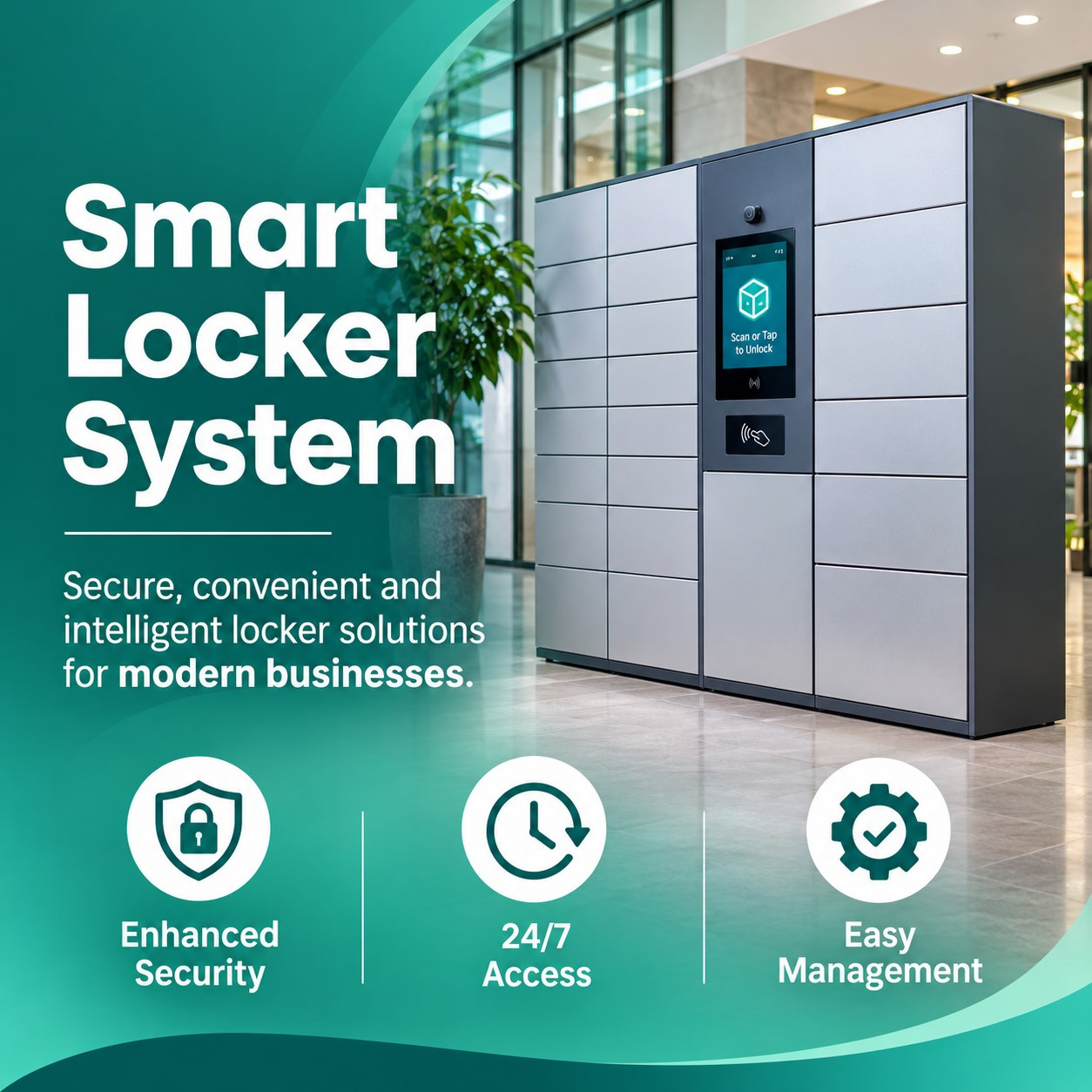
Understanding the Smart Locker System
A Smart Locker System is a network of secure compartments controlled by software, sensors, and a user interface. Instead of a physical key, users unlock a door with a QR code, a PIN, an RFID card, a mobile credential, or a biometric check. Every interaction becomes a time stamped event that administrators can review at any moment.
Core Components of the Platform
The platform has four layers that work together. The first layer is the cabinet, built from powder coated steel or durable composite panels with tamper resistant hinges. The second layer is the control unit, which manages electronic locks, door sensors, and the touchscreen kiosk. The third layer is the network connection that links every cabinet to the cloud or an on-premise server. The fourth layer is the management application, where permissions, compartment sizes, notifications, and reports are configured.
How Automation Improves Daily Operations
When a courier drops a parcel, the software assigns a free compartment, generates a one-time code, and notifies the recipient instantly through email, SMS, or an app message. When the recipient collects the item, the compartment is released for the next user without any staff involvement. Overdue items trigger reminders, and unusual events such as a door left open raise alerts. This closed loop process removes manual tasks that previously consumed hours of staff time each week.
Electronic Locker System Hardware and Connectivity
Reliable hardware is the foundation of any deployment. An Electronic Locker System depends on motorised or solenoid locks that withstand thousands of cycles, sensors that confirm whether an item is present, and backup power that protects operations during outages. In the UAE climate, cabinets placed in semi outdoor areas such as car parks and entrances should be rated for heat, humidity, and dust.
Connectivity options include wired Ethernet, wireless networks, and cellular modules, giving integrators flexibility when building layouts are complex. Open APIs allow the cabinets to share data with building management platforms, access control databases, human resources tools, and retail systems. Buyers should ask vendors about modular cabinet configurations so that compartment sizes can match small devices, shoe boxes, laptops, or large parcels without redesigning the site.
Digital Locker System Workflows for Daily Operations
A Digital Locker System turns physical storage into a workflow that fits each industry. Employees can reserve a compartment for the day, then release it automatically at shift end. Hospitals can issue sealed compartments for clean uniforms and return bins for used ones. Universities can lend laptops, calculators, and lab equipment while tracking every transaction against a student identity.
Typical Use Cases in the UAE
Corporate offices use shared compartments for hot desking, personal belongings, and IT asset handover. Residential towers in Dubai Marina and Downtown Dubai use parcel compartments so that residents collect deliveries at any hour without depending on reception staff. Online retailers use pickup points in neighbourhood locations, which reduces failed delivery attempts and last mile costs. Hotels offer secure luggage storage for guests arriving early or leaving late.
Reporting and Analytics
Dashboards display occupancy rates, average storage time, peak usage hours, and service exceptions. These insights help managers decide where to add capacity, how to adjust staffing, and which locations deliver the strongest return. Scheduled reports can be sent to department heads automatically, and audit trails can be exported when compliance teams request evidence.
Face Recognition Locker Access and Secure Authentication
Biometric authentication adds a strong layer of identity assurance. With Face Recognition Locker Access, a user approaches the kiosk, the camera captures a live image, and the system matches it against an enrolled template in a fraction of a second. No card can be lost, no PIN can be shared, and no code can be forwarded to the wrong person.
Quality implementations include liveness detection, which defends against photographs and screen replays, as well as encrypted template storage so that raw images are never exposed. Touchless operation also supports hygiene expectations in healthcare and food service settings. Organisations that need flexibility can combine face matching with a mobile credential or card, creating multi factor rules for high value compartments. Facilities that already use integrated access control and biometric platforms benefit from a single identity record across doors, turnstiles, and storage.
Smart Locker for Malls and Retail Destinations
Retail destinations are among the strongest candidates for automation. A Smart Locker for Malls gives shoppers a place to leave bags, click and collect orders, returns, and gifts while they continue browsing. Shoppers with free hands stay longer and spend more, and tenants gain a trusted pickup point that reduces pressure on store counters.
Mall operators in Dubai and Abu Dhabi also use storage kiosks for lost property, stroller and wheelchair handover, prayer room amenities, and event day luggage. Because the software records each transaction, guest services teams can answer queries quickly and resolve disputes with clear evidence. Sponsored screen content on kiosks can even create an additional advertising channel for the property.
Compliance, Trust, and Data Protection
Trust is earned through transparent processes and recognised standards. Buyers in the UAE should confirm that a provider follows the principles of the UAE Federal Decree Law No. 45 of 2021 on Personal Data Protection, particularly for biometric information, consent, retention periods, and data residency. Asking for security documentation, penetration test summaries, and alignment with ISO 27001 information security practices is a reasonable step during procurement.
Experience matters as much as certificates. A capable partner will survey the site, advise on cabinet placement and cable routes, coordinate with the fire safety and civil teams, train frontline staff, and provide local support with clear response times. Tektronix works as a regional systems integrator, so project managers and engineers can handle design, installation, integration, and maintenance under one accountable team. Readers who want to review product capabilities in detail can explore the full smart storage solution on the Tektronix website.
Operational Efficiency and Return on Investment
Automation reduces labour spent on key issue, parcel logging, and complaint handling, so employees can focus on customer service and higher value tasks. Fewer lost items and fewer disputes lower compensation costs, while accurate records improve accountability. Because compartments are reused throughout the day, a modest number of units can serve a large number of people, which improves space efficiency in premium locations.
Energy use is low, since cabinets draw power mainly during unlock events and display activity. Paper registers disappear, which supports corporate sustainability reporting. Over a typical contract period, organisations gain savings from reduced staffing hours, improved asset protection, and better customer retention, and they can measure each benefit through dashboard data.
Security Best Practices for Automated Storage
Strong security combines physical protection and digital controls. Cabinets should be anchored to the floor or wall, equipped with door sensors, and positioned within view of CCTV cameras so that every event can be matched with video evidence. Administrators should apply permission levels so that only authorised staff can open service doors, change compartment assignments, or export reports.
On the digital side, communication between kiosks and servers must be encrypted, user accounts should require strong authentication, and software updates should be applied on a regular schedule. Emergency override procedures, documented and tested with security teams, ensure that compartments can be opened safely during incidents such as fire alarms or power failures.
How to Evaluate and Deploy the Right Solution
Define Requirements Before Comparing Vendors
Start by listing the items to be stored, the number of daily transactions, the identity methods required, and the systems that must be integrated. Decide whether the data should reside in the cloud or on local servers. Estimate peak hour demand so that the kiosk interface and compartment count can handle busy periods without queues.
Pilot, Measure, and Scale
A pilot at one location lets the team verify user adoption, network stability, and reporting quality before wider rollout. Track metrics such as average retrieval time, items per compartment per day, support tickets, and user satisfaction. Once results meet targets, the same configuration can be replicated across branches, floors, or cities. Teams that want guidance on sizing and layout can request a deployment consultation from the Tektronix specialists.
Plan for Maintenance and Growth
Choose a platform that supports remote diagnostics, firmware updates, and the addition of new cabinets without service interruption. Preventive maintenance visits, spare part availability, and a documented service level agreement protect uptime and extend the life of the investment.
Conclusion
Tek Locker from Tektronix brings secure, software driven storage to organisations that want faster service and fewer manual tasks. Every Smart Locker System UAE project succeeds when the hardware, software, and local support are planned together from the first site survey. A Smart Locker System Dubai deployment can serve residential towers, offices, hotels, and retail centres with one consistent management experience. Choosing a dependable Locker System with open integrations protects your investment as operational needs grow.
Pairing mobile credentials with Locker Management Software gives your team full control, clear reporting, and a smoother experience for every user.
FAQs
1. What makes Locker Management Software different from a basic locker lock?
Basic locks only secure a door. Locker Management Software assigns compartments, authenticates users, sends notifications, records every event, and produces reports, which turns storage into an automated and auditable service.
2. Is a Smart Locker for Malls suitable for click and collect orders?
Yes. A Smart Locker for Malls can hold online orders, returns, and gifts, and it releases each item with a unique code or biometric match, so shoppers collect at their convenience without waiting at a counter.
3. How does Face Recognition Locker Access protect user privacy?
Face Recognition Locker Access stores encrypted templates instead of raw photographs, requires user consent, and follows defined retention rules, which supports compliance with UAE data protection expectations.
4. Can an Electronic Locker System work with our existing building platforms?
An Electronic Locker System with open APIs can connect to access control, human resources, visitor management, and retail applications, so identities and permissions stay consistent across the facility.
5. Where can I learn more about a Digital Locker System for my business?
You can review specifications and deployment options for a Digital Locker System on the Tektronix smart locker page, or contact the team for a site assessment and a tailored proposal.












Comments (0)