

10 GBPjet Features That Automate Your Google Business Profile
Keeping a Google Business Profile active takes weekly effort. Posts need writing, reviews need replies, listing details drift and rankings shift from one street to the next. Google Business Profile automation moves that routine work into software, so a person only handles the decisions.

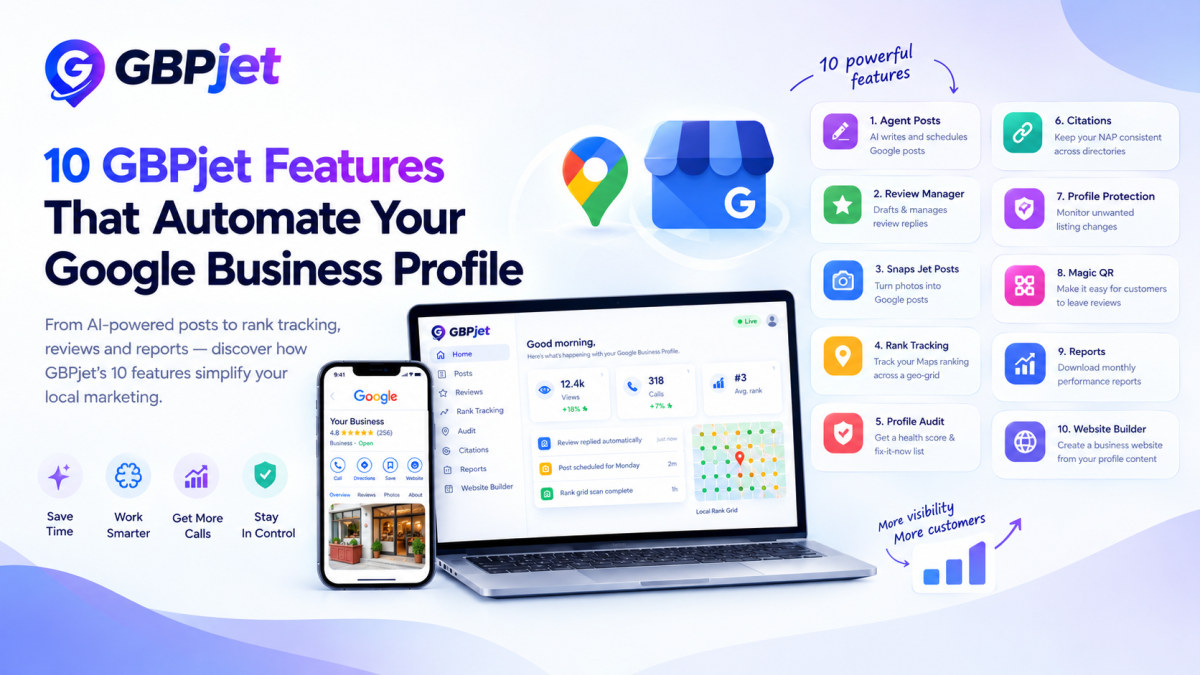
Keeping a Google Business Profile active takes weekly effort. Posts need writing, reviews need replies, listing details drift and rankings shift from one street to the next. Google Business Profile automation moves that routine work into software, so a person only handles the decisions.
GBPjet is a 10-in-1 Google Business Profile AI tool that splits Google Business Profile automation into ten features. This list explains what each feature does, what it asks of you and where it stops. It also covers pricing, limits and the kinds of business that gain from it.
Key takeaway: the ten GBPjet features cover Google Business Profile automation for posts, review replies, photo posts, rank tracking, audits, citation checks, change alerts, review QR codes, reports and a website. Each draft waits for your approval unless you switch on autopilot.
What does Google Business Profile automation cover?
Google Business Profile automation is software that performs recurring listing tasks for you: writing and scheduling posts, replying to reviews, checking profile details, tracking local rankings and producing reports.
Without it, every task is a separate chore. Someone has to think of a post topic, find an image, write the caption and publish it. Someone has to open each new review and write a reply. Someone has to check the opening hours after a holiday week. With several branches, the chores multiply.
Automation does not decide your services, prices or opening hours. It works from the details you supply, so wrong inputs produce wrong posts.
How does a Google Business Profile AI tool work in GBPjet?
A Google Business Profile AI tool writes the content, while a basic scheduler only publishes what you type. GBPjet works as an agent that runs this loop:
- Connect: you sign in with Google and choose the locations to manage. GBPjet reads your services, hours, photos and reviews from the profile.
- Draft: on a weekly cycle, the agent drafts posts, drafts replies to new reviews, runs audits and scans rankings.
- Approve: you check the drafts in the dashboard, on a phone if you like. You can approve in bulk, edit a draft or switch a task to autopilot.
- Publish: approved posts and replies reach your profile on the schedule you set.
- Measure: a monthly report shows views, calls, direction requests, rankings and reviews, and the audit list shows what to fix next.
The approval step sets the pace. A careful owner who reads every draft gets more control and less speed. A profile on autopilot gets the reverse. A sensible path is to start with approval on everything and loosen it only for low-risk tasks, such as replies to five-star reviews. AI drafts can still be wrong. A post can name an offer that ended last week, and a reply can miss the point of a complaint.
Which 10 GBPjet features handle Google Business Profile automation?
GBPjet's ten features automate posting, review replies, photo posts, rank tracking, audits, listing consistency, change monitoring, review collection, reporting and website creation. All of them sit in a single dashboard that also works on a phone.
1. Agent Posts
Agent Postswrites Google posts from your business details and schedules a month of them in one click. The agent learns your services and tone, adds a compliant image to each post and places the posts on a calendar. You approve the batch or let it publish on schedule. A dental practice might queue posts on preventive care, while a café might queue its weekly specials. Check offers and dates before approving.
2. Review Manager
Review Managerpulls in new reviews, drafts a reply in your voice and waits for you to approve it, edit it or let it post. You can set rules for automatic replies. A five-star review can run on autopilot, but a complaint about billing or treatment deserves your own words. Healthcare businesses need extra care, because a public reply must never confirm that a reviewer was a patient or mention their condition. The feature also shows star-rating trends over time.
3. Snaps Jet Posts
Snaps Jet Poststurns a photo into a live post. You take or upload a picture, the agent writes the caption and the post reaches your profile within seconds. It suits quick updates between scheduled posts, such as a new dish, a finished project or a fresh display. Look at the photo for customer faces or private details before it goes out.
4. Rank Tracking
Rank Trackingshows where your business appears in Google Maps for chosen keywords across a grid of points around your location. One average rank hides the fact that a business can sit third beside its door and eleventh a few streets away. You pick the keywords and service area, GBPjet scans the grid and a heat-map plots the positions so you can compare week to week. Treat the map as a measurement, not a promise, because ranking also depends on relevance, distance and prominence.
5. Profile Audit
Profile Auditscores your profile from 0 to 100 and lists what to fix first. The agent checks every field and flags gaps such as missing details, old photos or too few reviews. Each item links to the place where you fix it, and some fixes apply in one click. The score is GBPjet's own measure, not a Google rating.
6. Citations
The citation checkscompare your name, address and phone number against key directories and flag mismatches. You enter the correct details once, GBPjet checks them and you correct the inconsistencies it finds. Mismatched details can confuse customers and may weaken local rankings. Businesses with several branches gain the most, since every branch has its own number and hours.
7. Profile Protection
Profile Protectionwatches your listing for edits you did not make. GBPjet records a baseline of your name, address, phone, hours and categories, re-checks them on a schedule and alerts you when something changes. You accept or dismiss each change. Google, competitors or members of the public can edit a listing, so a wrong phone number can stay live for weeks if nobody looks. Real-time change alerts come with the Growth plan.
8. Magic QR
Magic QRgives customers a faster route to leaving a review. You print an A4 poster from the dashboard and place it at the counter. A customer scans the code, picks a review suggestion built from the services on your profile, edits it if they like and posts it to Google in one tap. Because suggestions are only a starting point, ask customers to change the text so it matches what they experienced. Never offer a gift or discount for a review, and ask every customer, not only the happy ones.
9. Reports
The Reports featuresends a monthly summary of views, calls, direction requests, rankings and reviews. You can download it as a PDF or send the highlights to WhatsApp, which suits agencies reporting to clients and owners who read on their phone. Read the numbers with care. A rise in calls can come from a festival season or a nearby competitor closing as easily as from posting.
10. Business Website Builder
Business Website Buildercreates a single-page website for each location from your profile, posts and reviews. Each site gets an address on GBPjet's domain, such as yourbusiness.gbpjet.site, and updates itself when your profile changes. It carries local business schema markup along with your name, address, phone, hours and services. It works as a second page that supports your main website, not a replacement for it, and the plan includes hosting.
What are the limits of Google Business Profile automation?
Google Business Profile automation saves time on routine tasks but cannot guarantee rankings, enquiries or good judgement. These are the limits to plan around:
- No ranking promise: Google decides rankings using relevance, distance and prominence. No tool controls them.
- Drafts need reading: an AI draft can repeat an outdated offer or misread a review.
- Sensitive replies need a person: you should handle complaints, disputes and anything involving patient details yourself.
- Plans cap usage: each plan limits posts, rank-grid scans, audits and reports, as listed below.
- Inputs set the quality: Google Business Profile automation works from the details you supply, so wrong hours or services lead to wrong posts and replies.
Who benefits from Google Business Profile automation?
Local businesses that depend on Google Maps enquiries and have little time for profile upkeep gain the most from Google Business Profile automation.
- Clinics and dentists: weekly posts and quick review replies keep the profile active. Follow your professional advertising rules and protect patient confidentiality.
- Restaurants and cafés: daily specials, fresh photos and fast replies to reviews suit Snaps Jet Posts and Review Manager.
- Salons: regular photos and posts make the profile look active, and the QR poster at the reception desk collects reviews.
- Multi-location brands: one login manages up to 20 locations, each billed separately, with posts, replies and rankings in one place.
- Agencies: monthly PDF reports and WhatsApp summaries make client reporting faster.
How much does GBPjet cost?
GBPjet charges for its Google Business Profile automation per active location each month. Its pricing page in October 2026 listed Starter at ₹1,599 and Growth at ₹2,499, both including GST.
- Starter: 1 active location, 10 bulk-scheduled posts, 3 agent-written posts with images, 5 Snaps Jet Posts, up to 100 review replies, 1 profile audit, 2 rank-grid scans, a downloadable report, the free business website and citations list access
- Growth: 1 active location, 15 bulk-scheduled posts, 6 agent-written posts with images, 10 Snaps Jet Posts, unlimited review replies, 2 profile audits, 4 rank-grid scans, unlimited reports, unlimited citations list access, real-time profile change alerts and Magic QR
You can deactivate a location at any time. It stops renewing at the end of the month, with no cancellation fee. GBPjet offers a guided demo on a real profile instead of a free trial. Prices and limits change, so check the current pricing page before you decide.
What results can you expect from Google Business Profile automation?
Results vary by business, and GBPjet's published figures are company-reported. The GBPjet homepage states that it works with more than 100 businesses and reports an average of 23.0% more calls (source: gbpjet.com, checked 26 October 2026).
Individual results sit well apart from that average. Two healthcare client examples on its client wins page show calls from the profile rising by 4.7% and 18.7%. Category, competition, profile quality and season all affect the outcome, and no automation tool can promise a specific ranking or number of enquiries.
How do you start with Google Business Profile automation in GBPjet?
Setup takes about two minutes, with no setup fee and no onboarding call.
- Connect your profile: sign in with Google and pick the locations you want to manage.
- Choose your approval mode: start with approval on every post and reply, and switch to autopilot only after you trust the drafts.
- Read the first batch: check the first month of posts and replies for tone, offers and accuracy, then edit what needs changing.
- Work through the audit: fix the top items on the Profile Audit list and set the keywords you want on the rank grid.
- Review the monthly report: compare views, calls and rankings against the previous month before changing anything.
Where should you go next?
If your profile needs regular posts, faster review replies and a clear view of local rankings, Google Business Profile automation can take over the routine work while you keep approval. Read about each feature on the GBPjet features page, compare the pricing plans or start from the GBPjet.














Comments (0)