

How to Choose the Right Gaming Accessories for Your Ultimate Gaming Setup
Discover the best gaming accessories for a better gaming setup, including keyboards, mice, headsets, controllers, mouse pads, monitors, and more.
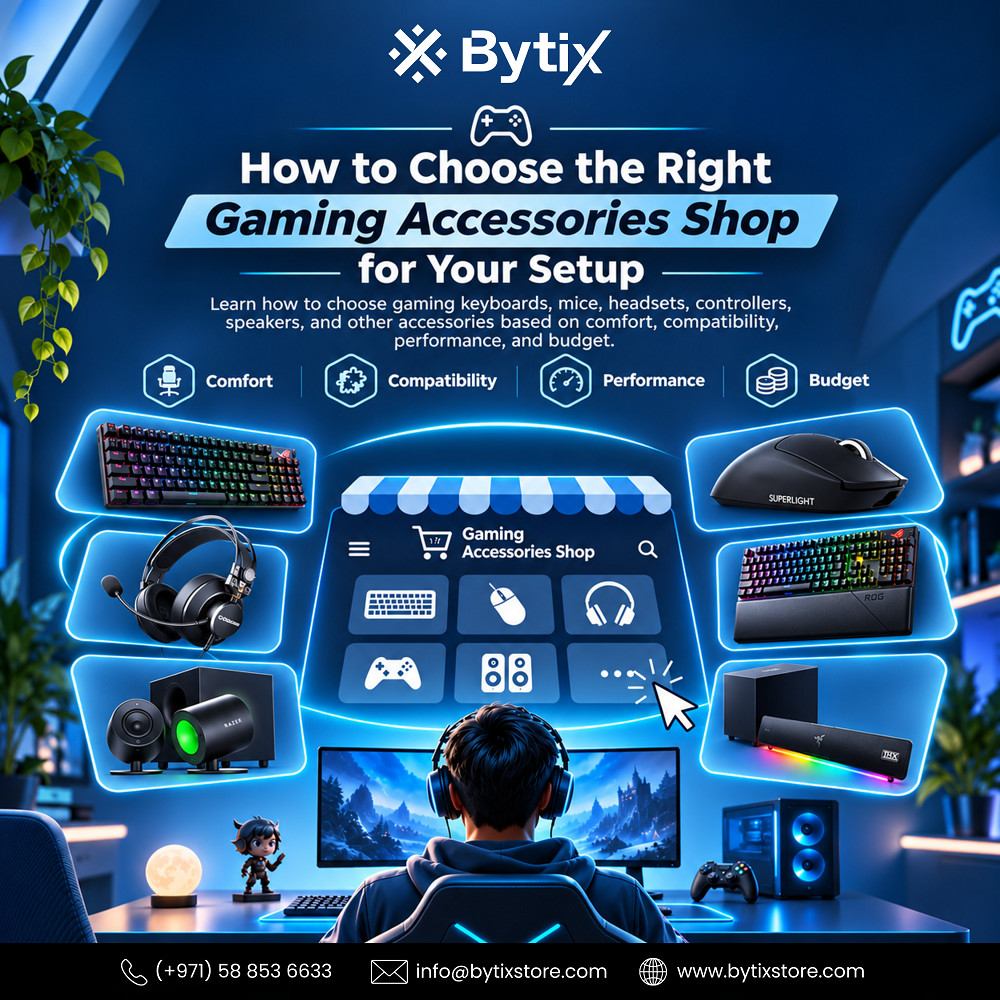
However, games are not all about having a good computer. With additional gaming accessories, you can enjoy the game even more and feel more comfortable. Accessories play a key role, so they matter when setting up a gaming system. You may buy gaming mice and keyboards, speakers and headphones, controllers, mousepads, webcams, and many other types of gaming accessories. Finding a reliable Gaming Accessories Shop can make it easier to compare different products and choose equipment that suits your games, setup, and budget.
Nowadays, gaming accessories play an integral role in any computer or console configuration. Professional gamers will likely focus on accuracy and responsiveness, while leisure gamers will place more importance on comfort. Gaming streamers will need microphones, cameras, lighting, and sound accessories, while people who work from home will want accessories that serve multiple purposes.
The best gaming setup does not necessarily require the most accessories. Rather, it will involve a combination of gadgets that complement each other and serve the required purposes. Knowing what kind of gamer you are will go a long way toward preventing wasteful spending.
Start With Your Gaming Requirements
Before heading to a gaming accessories store or shopping online, consider your regular computer usage. This depends on the types of games one likes, the duration of play, content creation, and whether it is used for work or education.
Competitive gamers will definitely look for a gaming mouse with fast response, mechanical keyboards, good-quality headsets, and a mousepad. Casual gamers will be more interested in comfortable, multifunctional gadgets without extra features. Streamers might need extra audio and video accessories. Fans of the computer game will like accessories that fit the gaming room interior.
Another important factor to consider is your budget. Rather than buying everything at once, decide which accessories are most crucial for your gaming needs.
Choosing the Right Gaming Mouse
A gaming mouse is probably one of the most-used accessories in computer gaming accessories. It enables the player to perform actions required for shooting, moving through menus, picking up objects, etc.
Various gaming mice suit different needs. Some gaming mice are lightweight and designed to help you move fast, while others come with extra buttons to perform more in-game commands. Size and shape are another important factor to consider.
When choosing a gaming mouse, consider sensor type, button placement, connectivity, size, weight, and comfort. Gamers who spend long hours playing games appreciate a comfortable, easy-to-use design.
The perfect mouse need not necessarily be the one with the most specifications. All it must do is match your playstyle and your hand.
Finding a Suitable Gaming Keyboard
A keyboard is an additional essential component of any PC gaming setup. There are different types of gaming keyboards, each with different configurations and formats.
Gamers prefer mechanical keyboards because of their distinct performance and feel. Several varieties of mechanical switches provide different amounts of feedback and noise, so you can choose based on your preferences.
Although some gamers prefer a full-sized keyboard with a number pad, others prefer smaller keyboards that leave more room for their mouse. RGB lighting is common because it helps match your keyboard with other gaming accessories.
Think not only about your gaming experience, but also about the keyboard's possible non-gaming applications.
Gaming Headsets for Better Audio
Sound quality is essential in gaming. Good gaming headphones help you distinguish sounds, communicate with others, listen to music, and handle many other audio-related tasks.
When playing multiplayer games, one needs a good-quality microphone to talk to fellow gamers easily. This is where comfort plays an important role, since gamers often use headsets for long hours.
When buying a pair of headphones, you should consider factors such as sound quality, microphone quality, comfort, connectivity options, compatibility, and control features. There are wired and wireless headphones.
If you plan to switch between multiple devices, check compatibility.
Gaming Speakers for an Immersive Setup
Not all gamers feel comfortable using a headset while playing games. One can use gaming speakers as another way to play games without using headphones.
The speakers can be used to watch films, listen to music, have online conferences, and even work on one’s PC.
When selecting gaming speakers, one should consider desk size, available space, connection options, sound preferences, and other factors. If you have a small desk, choose compact speakers; if you have a large room, choose powerful speakers.
Alternatively, speakers may be seen as decorations of the gaming station, like the desk and the good lighting.
Why a Good Mouse Pad Matters
A mouse pad may seem like a simple accessory, but it can influence how smoothly your gaming mouse moves.
Gamers’ mouse pads come in different sizes and materials. While some gamers prefer smaller mouse pads, others opt for large desk mats that provide enough space for both keyboard and mouse.
It is all about finding the right material that will suit your mouse and you. Gamers who move their mouse a lot may prefer larger mouse pads.
The right mouse pad will protect your desk from damage and keep things neat around your keyboard and mouse.
Gaming Controllers for Flexible Play
Though it is common practice to use a keyboard and mouse together to play games on PCs, there are many situations where a controller can come in handy.
This is because racing, sports, platformer, fighting, and some adventure games are better played using a controller.
Another reason to use a controller is that it offers flexibility if you use both PC and console platforms.
When choosing one to buy, make sure it's compatible with your platform and consider factors such as button layout, comfort, connectivity, battery life, and extra buttons.
The perfect controller will give you a new way to experience your games without changing your keyboard and mouse setup.
Webcams and Microphones for Streaming
Streamers and gamers recording video or podcasts may need additional peripherals beyond a standard keyboard, mouse, and headphones.
A webcam is used for face-cam streaming, video chatting, video conferences, and content creation. On the other hand, a dedicated microphone is helpful for a specialized audio setup for streaming, recording, podcasts, and communication.
When choosing your streaming hardware, consider your environment, available desk space, lighting, connectivity, and the type of content you are producing.
You don't always need professional gear when starting. Having a good-quality camera and mic will give you a solid foundation.
Gaming Accessories for Work and Study
Gaming peripherals are not limited to the gaming world. Other items can also serve daily computing tasks.
A mechanical keyboard can improve typing speed and productivity, while a comfortable mouse can help with office software and creativity. Headsets can come in handy in online meetings, and webcams will facilitate video calls.
Therefore, gaming peripherals are a great choice for individuals who need computers for various types of work. You don't have to buy two different computers to play games and do work.
Match Your Accessories With Your Gaming Desk
Consider your computer desk's physical setup when choosing accessories. Accessories like your keyboard, mouse pad, speakers, microphone, and monitor can eat up your desk space very fast.
Before buying your accessories, measure the space available on your desk.
Another crucial aspect to consider is cable management. Cable-driven accessories provide excellent connectivity, but they can make your desk untidy.
Wireless accessories help manage the mess created by several cables; however, you need to keep in mind the charging and connection requirements of the batteries.
An organized desk helps you have easy access to your hardware.
Choosing Accessories Based on Compatibility
The compatibility of the accessory you choose is crucial because not all accessories work with all types of gaming devices.
This will help you avoid complications later by making sure the accessories are compatible with your computer or gaming device.
It is also vital to consider how the devices connect to the accessories.
Quality Matters More Than Quantity
One more thing that people often do wrong is spending money on all sorts of accessories just because they are stylish. You don’t need to buy all those accessories for your computer.
It is better to choose a few high-quality accessories you will use every day. A good mouse, keyboard, headphones, and mousepad will be more practical than several different accessories.
As your needs change, you can purchase additional accessories.
This can make budget management easier.
Finding the Right Gaming Accessories Shop
If you're looking for a place to buy accessories for your game, seek a seller that offers a wide selection of products with clear specifications.
A store with organized product categories will make it easier to compare gaming mice, keyboards, headsets, speakers, controllers, mouse mats, webcams, and other accessories.
Customer support can help when you need assistance choosing the right accessory compatible with your PC or console.
Make sure you consider the purpose, cost, and compatibility while choosing the accessory.
Why Choose Bytix Store?
For gamers and PC enthusiasts, Bytix Store offers gaming accessories and computer products for different types of setups.
The range includes gaming keyboards, mice, headsets, speakers, controllers, mouse pads, webcams, monitors, gaming PCs, PC components, gaming chairs, and other products to create a complete gaming environment.
Whether you are building a new gaming system or updating an old one, you can select accessories based on your preferences for gaming, comfort, space, and budget.
If you have no idea what accessories to buy, share key details about your PC, gaming system, preferred games, and budget.
Build Your Setup Step by Step
You will not have to buy all the gaming accessories at once. Instead, start with the accessories that matter most for enhancing your gaming experience.
For PC gaming enthusiasts, the best place to start is with a high-quality mouse and keyboard. Then, a good set of headphones or speakers can enhance sound, while a mouse pad can improve movement.
Once you've established the basics, consider other accessories such as controllers, a webcam, a microphone, and lights.
This way, you will be sure you need whatever else you buy.
Consider Comfort During Long Gaming Sessions
Gaming peripherals shouldn't focus only on performance but also on comfort, especially for those spending long hours in front of their computers.
A mouse that is too small or too big can be uncomfortable, and an inappropriate keyboard layout might make it tiresome to use. An inappropriate headset can likewise become uncomfortable after some time.
The table and gaming chair come into play here as well, since the positioning of all of the above should be at a convenient height and distance.
Making yourself comfortable will definitely make your game much more fun.
Think About Your Future Setup
Your gaming set-up might also change in the future. You may get a new gaming computer, add a secondary screen, start streaming, or play other games.
When picking up accessories for your set-up, keep in mind whether they'll still be helpful once you upgrade.
For instance, having an easily adjustable mouse, headset, and game controller can provide more flexibility. Similarly, you can pick up a bigger mouse pad if you plan to get a wider desk in the future.
You don't need to anticipate every possible change, but being flexible can help later.
Make an Informed Choice
Your gaming accessories will depend on the type of gaming you like to do and what you want to improve.
When selecting accessories, consider your gaming style, comfort, desk space, devices, connectivity, and budget.
Don't follow every gaming trend; choose accessories that solve your gaming problems.
The right accessories for gaming may significantly improve control, communication, sound, comfort, and convenience, and help you waste money.
Conclusion
Finding the right Gaming Accessories Shop will make it easier to upgrade your gaming rig. Whether it is a responsive mouse, a mechanical keyboard, headphones, speakers, controllers, a mouse pad, a webcam, or a microphone, having the right gaming accessories will make you play better.
The best gaming setup isn't necessarily the one with the most products. It is the one where each accessory has a purpose and works well with the rest of your accessories.
Bytix Store offers gaming accessories, gaming PCs, monitors, PC components, gaming chairs, laptops, and other computer products for gamers and PC enthusiasts across Dubai and the UAE.
Looking to upgrade your gaming station? Share your gaming platform, favorite games, current gadgets, needs, and budget with Bytix Store so we can help you find the right gaming accessories for your setup. Contact Us for more information.
Frequently Asked Questions
What should I look for in a gaming accessories shop?
Choose a store that offers a wide range of gaming accessories, detailed product information, support for all gaming systems, and compatibility assistance.
What are the most important gaming accessories?
Key accessories will always vary depending on the type of gaming rig you have set up. In a computer, you will need accessories such as a keyboard, mouse, mouse pad, headset, or speakers for the best gaming experience.
How do I choose a gaming mouse?
Look at size, shape, weight, sensors, buttons, connectivity, and how comfortable it feels to hold. Comfort matters because you'll be using it for several hours.
Are mechanical keyboards good for gaming?
One type of keyboard used by gamers is the mechanical keyboard. The best type depends on the gamer’s preferred layout and key performance characteristics.
Should I choose a gaming headset or speakers?
Headsets allow for targeted audio and more personal communication, whereas speakers create a more open audio environment. This depends on your personal situation and preferences.
Do I need a gaming mouse pad?
A gaming mouse pad provides an even surface for moving the mouse and is especially helpful for gamers making big or frequent movements.
Can gaming accessories be used for work?
Indeed, gaming peripherals such as gaming keyboards, mice, headsets, webcams, and microphones can equally be used in office work, video conferencing, learning, content creation, and general computing.
What gaming accessories are useful for streaming?
Streamers may need an appropriate microphone, webcam, headphones, keyboard, mouse, lighting, and other devices based on the kind of content they produce.
How do I know whether an accessory is compatible with my PC?
Check product specifications to see which operating systems, connection methods, platforms, and software requirements are supported. If you are unsure, clarify with the vendor before making your purchase.
Where can I find a gaming accessories shop in Dubai?
Bytix Store offers a variety of products, including gaming accessories, gaming computers, gaming monitors, gaming chairs, laptop computers, and more.
Can Bytix Store help me choose gaming accessories?
Absolutely. You can share your gaming platform, computer specifications, preferred games, the accessories you already have, the accessory's purpose, and your budget.

Bytix is an online store specializing in computer hardware and peripherals. Founded in 2024 and headquartered in Dubai, UAE, we offer a wide range of products, including CPUs, GPUs, RAM, storage devices, motherboards, cases, power supplies, monitors, keyboards, mice, and more. In addition to products, Bytixstore.com provides a variety of services such as custom PC builds, technical support, and warranty repairs. We have earned a strong reputation for excellent customer service and competitive pricing. We offer free shipping on all orders above AED 899 within the UAE, making us a convenient choice for customers looking to purchase computer hardware and peripherals online in Dubai and beyond.
















Comments (0)