

How Ovvi POS Connects Front-of-House and Kitchen Operations

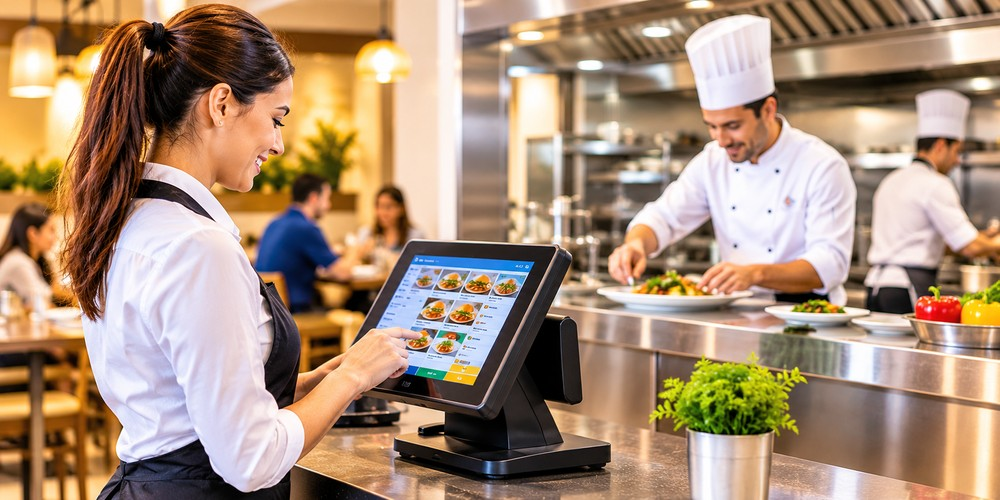
Running a restaurant requires good communication between the front-of-house team and kitchen staff. From taking customer orders to preparing meals and handling payments, every step needs to work smoothly. When these operations are not connected, restaurants may face order mistakes, slow service, long waiting times, and confusion among employees.
A modern point-of-sale (POS) system can help solve these problems by bringing different restaurant activities together. Ovvi POS helps restaurants manage important tasks through connected ordering, kitchen management, and payment solutions. It allows staff to send customer orders to the kitchen, organize food preparation, and manage payments through an integrated system.
When front-of-house and kitchen operations work together, restaurant employees can focus more on customer service and food preparation instead of spending time fixing communication problems. Understanding how Ovvi supports this connection can help restaurant owners improve their daily operations.
Understanding Front-of-House and Kitchen Operations
Before looking at how Ovvi connects restaurant activities, it is important to understand the two main areas of restaurant operations.
What Is Front-of-House?
Front-of-house refers to the areas where customers interact with restaurant employees. It includes the dining area, reception, cashier counter, and other customer-facing spaces.
The front-of-house team usually handles:
-
Greeting customers and managing tables.
-
Taking food and drink orders.
-
Answering customer questions.
-
Sending orders to the kitchen.
-
Processing customer payments.
-
Managing bills and receipts.
These employees need a simple way to enter orders and share the correct details with kitchen staff.
What Is Back-of-House?
Back-of-house mainly refers to the kitchen and food preparation areas. This is where chefs and kitchen employees prepare meals, manage ingredients, and complete food orders.
Common kitchen responsibilities include:
-
Receiving new customer orders.
-
Preparing food based on order details.
-
Managing special food requests.
-
Checking order status.
-
Coordinating food preparation.
-
Completing orders for serving or takeaway.
Both departments depend on each other. If the front-of-house team enters an incorrect order or delays sending it to the kitchen, the entire service process can slow down.
How Ovvi POS Connects Front-of-House and Kitchen Operations
A connected POS system helps restaurant employees share information without depending on repeated conversations or handwritten order slips. Ovvi POS supports this process by bringing order entry, kitchen management, and payment activities into one connected system.
Here are some ways this connection can improve restaurant operations.
1. Sends Customer Orders Directly to the Kitchen
One of the most important steps in restaurant service is sending customer orders to the kitchen correctly. Traditional restaurants may use handwritten notes or verbal instructions. These methods can create confusion, especially during busy hours.
With Ovvi POS, front-of-house employees can enter orders through the POS terminal. Orders can then be routed to compatible kitchen displays or printers, depending on the system configuration.
For example, when a customer orders a burger, fries, and a drink, the employee can enter all items into the system. The kitchen receives the relevant food order, while different preparation stations can receive their assigned items when routing is configured.
2. Improves Order Accuracy
Incorrect orders can affect customer satisfaction and increase food waste. A customer may receive the wrong meal because of unclear handwriting, missed instructions, or poor communication between employees.
Ovvi POS helps improve order accuracy by allowing employees to select menu items and available order options directly through the system.
For example, a customer may request:
-
A burger without onions.
-
Extra cheese.
-
A specific side dish.
-
A drink without ice.
When these details are entered correctly, the kitchen team can receive clearer instructions. The Ovvi Kitchen Display System can also show order customizations and dietary information to help kitchen employees understand customer requests.
Accurate order entry reduces the need to ask the front-of-house staff for missing information.
3. Keeps Kitchen Staff Informed About Incoming Orders
Kitchen employees need to know which orders are waiting, which meals are being prepared, and which orders are ready to serve.
Ovvi offers a Kitchen Display System that shows incoming orders in an organized digital format. Instead of depending only on paper tickets, kitchen staff can use the display to check order details and manage their preparation tasks.
The system also supports order filtering by station, customer name, or order destination. This helps employees focus on the orders assigned to their preparation areas.
For example, the grill station can focus on food items that require grilling, while other kitchen employees can handle salads, sides, and desserts.
This is particularly useful during busy lunch and dinner hours when several orders may arrive within a short period.
4. Reduces Delays Between Departments
Restaurant delays often happen when information does not reach the right employee at the right time. A waiter may need to walk to the kitchen to confirm an order, or kitchen staff may need to ask about a missing item.
A connected POS system helps reduce these unnecessary steps.
When an order is entered and sent through Ovvi, kitchen employees can receive the information through the connected display or printer. They can begin preparation without waiting for someone to deliver the order manually.
The kitchen display also provides preparation-time monitoring, helping restaurant teams understand how orders are progressing.
This creates a smoother workflow and allows employees to spend more time on their main responsibilities.
5. Supports Better Table and Order Management
Restaurants need to manage multiple tables, customer orders, and payments throughout the day. Keeping track of everything manually can become difficult, especially during peak hours.
Ovvi POS offers restaurant features such as customizable table layouts, table-side ordering, and check management.
For example, when a customer requests another drink or adds a dessert, the employee can update the order through the POS system. The updated information can then be shared with the relevant preparation area.
Servers can also use compatible mobile tablets to take orders and accept payments at the table. This helps reduce unnecessary trips to the cashier counter and supports a more convenient dining experience.
6. Connects Order Management With Payment Processing
Taking orders and processing payments are two important parts of restaurant service. When these activities are managed through disconnected systems, employees may need to enter information more than once.
Ovvi brings supported ordering and payment activities into a connected workflow.
Restaurant employees can use the POS system to manage customer orders, review bills, and process transactions through compatible payment terminals.
For example, after a customer finishes a meal, the cashier can review the bill and process the payment. Restaurants can also use supported check-splitting features when customers want to pay separately.
This makes checkout easier and helps businesses maintain organized transaction records.
7. Connects Online Orders With Kitchen Operations
Many restaurants receive orders from websites, delivery applications, and other online channels. Managing these orders separately from in-store orders can create additional work for employees.
Ovvi supports integrations with online ordering and delivery services. These integrations can bring incoming digital orders into the POS workflow and route them to kitchen printers or other supported preparation systems.
For example, a restaurant may receive five online orders while also serving customers inside the dining area. A connected system helps employees manage both types of orders through a more organized process.
This can reduce the need to switch between different devices and manually enter the same order details.
8. Helps Employees Manage Busy Restaurant Hours
Restaurant operations become more challenging during weekends, holidays, and lunch or dinner rushes. More customers mean more orders, more payments, and greater pressure on employees.
Ovvi POS can help organize these activities by providing connected tools for order entry, kitchen preparation, and payment processing.
Front-of-house employees can focus on customer service, while kitchen staff concentrate on preparing meals. Managers can also use available reporting features to review sales and other business information.
This division of responsibilities helps reduce unnecessary interruptions and supports better teamwork.
Why Restaurants Need a Connected POS System
Customers expect restaurants to provide accurate orders, timely service, and simple payment options. Even a small communication problem can affect the overall dining experience.
A connected POS system helps restaurants manage different activities without depending on separate manual processes. It also gives employees a more organized way to handle orders and transactions.
For growing restaurants, this connection becomes even more important. As customer numbers increase, managing orders through handwritten notes and verbal instructions can become difficult.
Ovvi offers restaurant-focused POS technology with features such as kitchen display management, mobile ordering, table management, online ordering integrations, and reporting. These tools can help restaurants build a more connected workflow.
What to Consider Before Choosing an Ovvi POS Setup
Every restaurant has different operational needs. A small cafe may require a simple ordering and payment setup, while a large restaurant may need multiple terminals and kitchen displays.
Before selecting an Ovvi POS solution, restaurant owners should consider the following points:
Restaurant Size and Requirements
Check how many employees, service counters, tables, and kitchen stations will use the system. This helps determine the type of POS setup required.
Kitchen Display Compatibility
If the restaurant wants to replace paper tickets with digital order screens, check the available kitchen display features and hardware requirements.
Payment Options
Consider the payment methods customers commonly use, including credit cards, debit cards, and contactless payments where supported.
Ease of Use
Employees should be able to enter orders, update items, and process payments without dealing with complicated steps. A simple interface can also make staff training easier.
Online Ordering Integrations
Restaurants that accept delivery and takeaway orders should check which online ordering platforms can connect with the selected POS setup.
Technical Support
Restaurants depend on their POS systems throughout the day. Check the available support options, hardware assistance, and system requirements before making a decision.
How a Connected POS System Improves the Customer Experience
The main goal of connecting front-of-house and kitchen operations is to create a better experience for customers.
When orders reach the kitchen correctly, employees can prepare meals with fewer interruptions. When payment processing is organized, customers can complete their transactions more easily.
A connected Ovvi POS workflow can help restaurant teams manage these steps in a more structured way.
For example, imagine a family visiting a restaurant during a busy evening. The waiter takes their order and enters it into the POS system. The kitchen receives the food details, prepares the meals, and completes the order. After dining, the family receives the bill and pays through the available payment terminal.
Each step depends on clear communication between restaurant departments. A connected system helps employees manage these activities with less manual effort.
Frequently Asked Questions (FAQs)
1. What is Ovvi POS?
Ovvi POS is a point-of-sale solution designed to support restaurant and retail operations. Its restaurant features include order management, kitchen display solutions, table-side ordering, payment processing, and reporting.
2. How does Ovvi POS connect front-of-house and kitchen operations?
Ovvi POS connects these departments by allowing front-of-house employees to enter customer orders and send them to compatible kitchen displays or printers. This helps kitchen staff receive order details more clearly.
3. Can Ovvi POS help reduce restaurant order mistakes?
Yes. Entering orders digitally can reduce mistakes caused by unclear handwriting or verbal communication. Accurate item selection and special instructions also help kitchen employees understand customer requests.
4. Does Ovvi POS support kitchen display systems?
Yes. Ovvi offers a Kitchen Display System that helps kitchen employees view incoming orders, manage order customizations, filter orders, and monitor preparation times.
5. How can Ovvi POS improve restaurant service speed?
Ovvi POS can reduce manual communication, send orders to the kitchen, and organize preparation activities. These features help employees manage their tasks more efficiently.
6. Can Ovvi POS manage customer payments?
Yes. Ovvi supports payment processing through compatible payment terminals and configurations. Available payment methods depend on the selected setup.
Conclusion
Connecting front-of-house and kitchen operations is an important part of running an organized restaurant. From entering customer orders to preparing meals and processing payments, every department needs accurate information to work smoothly.
Ovvi POS can help restaurants connect ordering and payment activities through features such as kitchen display management, table-side ordering, online order integrations, and check management. With the right hardware and software configuration, restaurant owners can improve communication, reduce manual work, and organize daily tasks.
Choosing a suitable payment and POS solution is an important step toward improving restaurant operations. Businesses can explore the available POS systems and payment processing solutions from Direct Processing Network to find options that support their ordering, transaction, and business management needs.














Comments (0)