

Is Instagram DM Automation Safe? A Complete Guide to Protecting Your Account


Instagram DM automation can make customer communication much easier. Instead of manually answering every comment or message, businesses can use automation to respond quickly, qualify conversations, and handle repetitive enquiries.
But automation also raises an important concern:
Could an automated Instagram DM system put your account at risk of a restriction or ban?
The answer depends on how the system operates.
Automation that uses Meta's supported connection methods and responds appropriately to genuine user interactions is very different from a browser bot that imitates human activity or a service that sends unsolicited messages.
Understanding that difference is the starting point for using Instagram automation responsibly.
What Makes Instagram DM Automation Safer?
A useful way to evaluate an automation system is to look at the complete conversation flow.
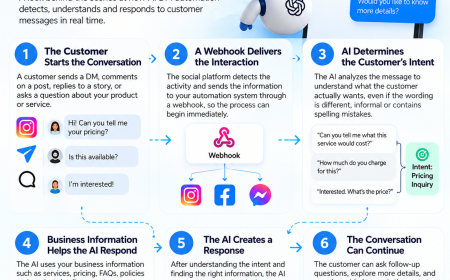
A typical safer workflow looks like:
Customer interaction → automated response → conversation continues → human handoff when necessary
The customer might comment on a post, reply to a story, or send a direct message. The automation then responds to that existing interaction.
This is different from a system that searches for users and automatically sends promotional DMs to people who have never contacted the business.
The starting point of the conversation matters.
Start With the Connection
Before looking at message volume or AI features, find out how the automation tool connects to Instagram.
A platform using Meta's official messaging connection should take you through a standard authorization process.
You should not have to type your Instagram password into a third-party automation dashboard.
This is one of the easiest checks you can perform before choosing a tool.
If a provider cannot clearly explain how it connects to Instagram, ask for more information before giving it access to your business account.
Official Integration vs. Browser Bots
Instagram automation tools can operate in very different ways.
Some communicate through Meta's official APIs. Others control Instagram through a browser and imitate the actions of a person.
Browser-based systems may perform actions such as:
-
Clicking through Instagram
-
Opening profiles
-
Typing messages
-
Navigating pages
-
Sending DMs automatically
This approach is fundamentally different from an application using Meta's messaging infrastructure.
For a business account, understanding which method your provider uses is essential.
Behaviors That Can Increase Account Risk
Several automation practices deserve particular attention.
Using Your Instagram Password
A third-party service should not need your Instagram password when it uses Meta's official authentication system.
Sharing credentials can expose your account and may indicate that the service is not using the standard authorization route.
Running Browser Automation
Browser bots and extensions can imitate human activity. That can create patterns of behavior that Instagram's systems may view as suspicious.
Contacting Users Who Never Engaged
Automated outreach to people who have never interacted with your account can resemble spam.
A more appropriate workflow is to respond to people who have already started an interaction.
Sending Repeated Promotions
Even after a customer has contacted you, automation should not bombard them with sales messages.
Repeated promotional follow-ups can make a legitimate conversation feel like spam.
Using Poor-Quality Message Copy
The words inside the message matter too.
Overly aggressive promotions, excessive urgency, misleading claims, repeated links, and other spam-like patterns can create a poor customer experience.
Don't Focus Only on Message Volume
Many businesses assume that account safety is simply about staying below a particular number of DMs.
That is too simplistic.
The nature of the messages, the recipients, the API being used, and the overall behavior of the account all matter.
This is particularly important when discussing the popular “200 DMs per hour” claim.
The Truth About the 200-DM Figure
The number 200 appears frequently in discussions about Instagram automation.
Some articles present it as an official Meta limit.
However, Meta's rate-limit documentation does not establish one universal rule saying every Instagram account can send exactly 200 DMs per hour.
Some developer resources have discussed limits of approximately 200 API calls per hour.
But an API call is not necessarily equivalent to a message delivered to an Instagram user.
Those two concepts can easily become mixed together when information is repeated without technical context.
What Does This Mean for Businesses?
Do not build your automation strategy around a single number.
Instead, find out:
-
Which API the tool uses
-
How it handles rate limits
-
Whether it manages pacing automatically
-
How it responds when limits are reached
-
Whether the provider documents its Instagram integration
A sensible message volume is more useful than trying to find a supposed “safe” number that guarantees account protection.
Can a Legitimate Account Still Be Restricted?
Yes.
Following Instagram's rules lowers the likelihood of avoidable problems, but it does not guarantee that an account will never be flagged.
Instagram uses automated systems to detect suspicious behavior, spam, and potential violations at a very large scale.
Automated enforcement can identify genuine violations, but legitimate activity can also occasionally be caught incorrectly.
That is why businesses should prepare for both normal operation and unexpected account restrictions.
What to Do If Instagram Flags Your Account
If your account receives a warning or restriction, the first priority is to stop making the situation harder to diagnose.
1. Pause the Automation
Temporarily stop automated messages while you investigate.
2. Read the Instagram Notice
Check the account-status section and review the exact reason Instagram provides.
3. Review Recent Conversations
Look for unusual patterns such as:
-
A sudden increase in message volume
-
Repetitive messages
-
Multiple promotional follow-ups
-
Messages sent without prior interaction
-
Suspicious or excessive links
4. Use Instagram's Review Process
If Instagram gives you a review or appeal option, follow the instructions provided.
Keep your explanation factual and concise.
5. Protect Your Lead Database
Do not allow Instagram to become the only place where your leads exist.
Maintain a separate CRM, customer database, email list, or another appropriate backup.
If your Instagram account becomes unavailable, your business should still have access to its customer information.
The Message Itself Can Create Problems
Technical compliance is only part of the picture.
Imagine an automation system that technically connects through an approved API but sends the same aggressive sales pitch to every customer.
The technology may be legitimate, but the customer experience can still be poor.
A good automated response should address the user's actual intent.
If someone asks about:
-
Price → answer the pricing question
-
Availability → provide availability information
-
Product details → provide relevant details
-
Location → provide the requested location information
Automation should reduce friction rather than create another layer of it.
Keep Follow-Ups Relevant
Automated follow-ups need restraint.
One useful reminder may help a potential customer continue a conversation.
A series of repeated promotional messages can have the opposite effect.
Keep follow-ups connected to the customer's original request and avoid sending messages simply because the automation system can.
Make AI Disclosure Clear
People should know when they are interacting with an automated assistant.
Meta recommends transparency around automated experiences, and disclosure can also make the customer experience more predictable.
A simple message can be enough:
“You’re chatting with our automated assistant. A team member can help you if needed.”
This tells the customer what to expect without interrupting the conversation.
Know When to Bring in a Human
AI automation should not try to solve every possible problem.
There are situations where a human should take over.
These can include:
-
Difficult complaints
-
Refund or payment concerns
-
Sensitive customer issues
-
Complex service questions
-
High-value prospects
-
Questions outside the AI's confidence level
The ability to hand off a conversation is therefore an important feature when evaluating an automation platform.
A Quick Safety Review for Your Current Tool
Take two minutes to check your existing automation setup.
Login
Does the tool use Meta's official authorization process?
Password
Does it ask you to provide your Instagram password?
Conversation Source
Does it primarily respond to people who have already interacted with your account?
Message Pacing
Can you understand or control how quickly the system sends messages?
Platform Transparency
Does the provider explain its Instagram integration and limitations clearly?
Human Support
Can a real person take over a conversation?
Lead Ownership
Can your leads be exported or synchronized with another system?
If you cannot answer these questions, ask the provider before relying on the automation for important customer conversations.
Why Backup Channels Matter for Indian Businesses
Instagram is a major customer-acquisition and communication channel for many Indian creators, agencies, D2C brands, coaches, and service businesses.
That makes account access an operational concern.
One useful precaution is to maintain another communication channel for important customer relationships.
For many Indian businesses, WhatsApp can complement Instagram conversations and provide another way to stay connected with leads.
The important principle is to avoid making one social media account your entire customer database.
Businesses should also be cautious about creating sudden spikes in activity when a new automation tool is introduced.
How Setter Approaches Instagram Automation
Setter connects to Instagram through Meta's official messaging connection.
Access is approved through the normal Meta authorization process rather than by giving the platform an Instagram password.
The system is designed around conversations initiated through comments or messages and can transfer a conversation to a human when the AI is not confident about the response.
The approach does not rely on promising zero risk.
Instead, it focuses on practical safeguards such as:
-
Official Meta connectivity
-
User-initiated conversations
-
Appropriate pacing
-
Relevant responses
-
Human handoffs
Businesses can explore Setter and the broader DM AI automation offering to understand how this approach works in practice.
Frequently Asked Questions
Can Instagram restrict an account for using automation?
Yes. Accounts can face restrictions when activity violates Instagram's policies.
Unofficial automation, credential sharing, unsolicited messages, excessive activity, and spam-like communication can increase account risk.
Does using an official automation tool guarantee safety?
No.
Using supported infrastructure can reduce avoidable risks, but no provider can guarantee that an account will never be flagged.
Is ManyChat safe to use with Instagram?
ManyChat is a widely used Instagram automation platform that uses Meta's official channels.
However, the way the account is configured and operated still matters. Message content, recipients, frequency, and overall activity can influence account risk.
Can I send 200 automated DMs every hour?
Do not treat 200 DMs per hour as a universal Meta-approved threshold.
Meta's rate-limit documentation involves API-specific limits, and an API call should not automatically be interpreted as one DM.
What should I do if my automation is flagged?
Pause the automation, review the Instagram notification, check your recent activity, and use the review or appeal process if Instagram provides one.
Is it safe to share my Instagram password with an automation tool?
A platform using Meta's official authorization process should not require your Instagram password.
Avoid handing your credentials to third-party automation services.
What happens if my Instagram appeal fails?
There is no guaranteed restoration process.
That is why businesses should maintain independent copies of their leads and customer information instead of relying exclusively on Instagram.
Final Thoughts
The question is not simply whether Instagram DM automation is safe or unsafe.
The more useful question is:
Is your particular automation setup using Instagram in a way that minimizes unnecessary risk?
Look at the connection method first. Then examine who receives your messages, how frequently they are sent, what the messages contain, and whether the system can hand conversations to humans.
Avoid password-based integrations, browser bots, unsolicited outreach, repetitive promotions, and spam-like messaging.
At the same time, remember that even compliant accounts can occasionally be flagged by automated systems.
The best preparation is therefore twofold: build a responsible automation workflow and keep your customer data somewhere other than Instagram.
That gives your business a more sustainable way to use DM automation without making your entire customer communication system dependent on a single platform.











Comments (0)