

How to Build a Standardized Lenovo Device Fleet
Learn how businesses can build a standardized Lenovo device fleet to simplify IT management, improve security, streamline support, control costs, and support employee productivity.

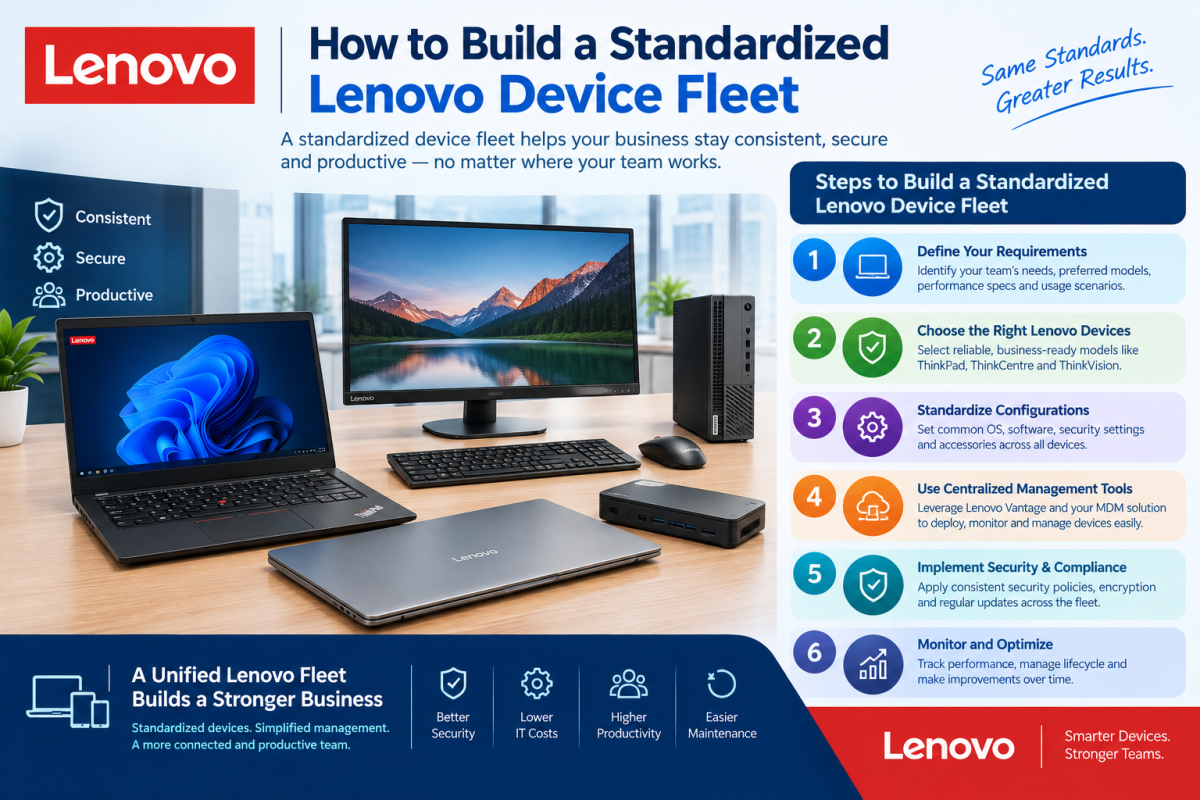
How to Build a Standardized Lenovo Device Fleet
Managing laptops and other business devices becomes more complicated as an organization grows. When employees use different models, specifications, operating systems, and configurations, IT teams may spend more time troubleshooting compatibility issues, deploying software, managing security, and replacing hardware.
A standardized Lenovo device fleet gives businesses a structured approach to selecting, configuring, deploying, and managing devices. Atop Computer Solution LLC can help organizations evaluate Lenovo hardware requirements and create device standards that align with employee roles, business applications, security policies, and long-term IT plans.
Need a trusted Lenovo Laptop Dealer in Dubai, UAE? Discover business-ready Lenovo laptops through Atop Computer Solution LLC.
Understand Your Business Requirements
The first step in creating a standardized device fleet is understanding how employees use technology. Different departments may have different workloads, applications, mobility requirements, and performance expectations.
For example, administrative employees may need systems for email, Microsoft 365, web applications, and document management, while designers, developers, engineers, or analysts may require higher-performance configurations. Understanding these requirements helps businesses create practical device categories instead of using one specification for everyone.
Create Device Categories by Job Role
A standardized fleet does not necessarily mean purchasing exactly the same Lenovo device for every employee. Businesses can create several approved device categories based on job responsibilities and workload requirements.
A company might establish standard configurations for general office users, mobile employees, power users, and specialized professionals. This approach provides consistency while ensuring that employees receive hardware appropriate for their daily responsibilities.
Select Appropriate Lenovo Models
Once employee requirements are identified, businesses can evaluate suitable Lenovo business laptop and desktop models. The selection should consider processor performance, RAM, SSD storage, display requirements, connectivity, portability, security, and other relevant specifications.
Organizations should avoid choosing devices based solely on price or maximum specifications. The objective is to establish configurations that provide sufficient performance for the intended workload while remaining practical for the company's budget and device lifecycle strategy.
Standardize Hardware Specifications
Hardware standardization can make IT management easier because employees within the same role can use similar configurations. Standard specifications can cover areas such as processor class, memory, storage, display requirements, connectivity, and supported accessories.
Standardization also helps IT teams understand the expected capabilities of each device category. When a technical issue occurs, support teams can work from known configurations instead of troubleshooting a large number of completely different systems.
Standardize Operating Systems and Software
Hardware is only one part of a standardized device fleet. Businesses should also establish consistent operating system versions, required applications, security software, productivity tools, and company configurations.
A standardized software environment can simplify deployment and support while reducing compatibility problems. Organizations should maintain approved software versions and ensure that required applications are tested before being deployed across the fleet.
Establish Security Standards
Every Lenovo device used for business should follow the organization's security requirements. These requirements can include authentication controls, encryption, endpoint protection, security updates, access policies, and device management.
Security standards should be applied consistently across the fleet while allowing additional controls for employees handling particularly sensitive information. Businesses should also establish procedures for lost devices, compromised accounts, and devices that no longer meet security requirements.
Use Centralized Device Management
Centralized device management allows IT teams to monitor, configure, update, and manage business devices more efficiently. Instead of manually configuring every Lenovo laptop, organizations can use appropriate management platforms to apply standardized settings and policies.
Centralized management can also help businesses maintain visibility across their device fleet. IT teams can track device status, software configurations, security requirements, and other information needed for effective endpoint administration.
Looking for Lenovo laptops, desktops, or workstations? Get reliable Lenovo business solutions from Atop Computer Solution LLC.
Standardize Accessories and Peripherals
A device fleet can become less standardized when employees use a wide range of chargers, docking stations, monitors, keyboards, mice, and other peripherals. Businesses should therefore define approved accessories alongside their Lenovo device configurations.
Standardized peripherals can make replacements easier and simplify workplace setups. It can also help IT teams maintain compatibility between laptops, docking stations, monitors, and other equipment used throughout the organization.
Create a Device Deployment Process
Businesses should establish a repeatable process for preparing Lenovo devices before employees receive them. This process can include operating system configuration, software installation, security settings, user enrollment, device management, and required company policies.
A consistent deployment process reduces the amount of manual work required for each device. It can also help employees receive systems that are ready for business use instead of spending significant time configuring their computers after deployment.
Maintain Accurate Asset Records
A standardized fleet should be supported by accurate IT asset records. Businesses should maintain information about device models, serial numbers, assigned users, purchase dates, warranty status, configuration, and lifecycle information.
Accurate records help IT teams understand what hardware the organization owns and where each device is being used. They can also support budgeting, warranty management, replacement planning, and security investigations when required.
Plan for Maintenance and Support
Even standardized devices require regular maintenance and technical support. Businesses should establish processes for operating system updates, application updates, security patches, hardware troubleshooting, repairs, and device replacement.
Using standardized hardware can make support more predictable because IT teams become familiar with a smaller number of approved configurations. This can help reduce troubleshooting complexity and improve consistency when resolving common device issues.
Plan the Device Lifecycle
A device fleet should be managed throughout its entire lifecycle, from procurement to retirement. Businesses should determine how long different Lenovo devices are expected to remain in service and establish replacement criteria based on performance, security, warranty status, and business requirements.
Lifecycle planning also allows organizations to forecast future IT spending. Instead of replacing devices unexpectedly after failures, businesses can plan purchases and migrations in advance while maintaining consistent hardware standards.
Control IT Costs
Standardization can help businesses manage technology spending by reducing unnecessary variation across their device fleet. Purchasing approved configurations in a structured manner can simplify procurement and make budgeting easier.
Cost control should not focus only on the initial purchase price. Organizations should also consider support, maintenance, accessories, software, warranty coverage, employee productivity, and replacement costs when evaluating the long-term value of their Lenovo device strategy.
Review the Fleet Regularly
Technology requirements change over time, so a standardized device fleet should not remain unchanged indefinitely. Businesses should periodically review device performance, employee feedback, application requirements, security needs, and available hardware options.
Regular reviews allow organizations to update approved configurations when necessary. This helps prevent outdated standards from becoming a limitation while maintaining enough consistency to keep device management practical.
Why Choose Atop Computer Solution LLC?
Atop Computer Solution LLC helps businesses plan and manage IT equipment according to their operational requirements. For organizations building a Lenovo device fleet, professional IT support can assist with hardware selection, specification planning, procurement, configuration, deployment, asset management, and ongoing technical support.
A well-planned device standard can make business IT easier to manage while supporting security, productivity, and predictable technology costs. Atop Computer Solution LLC can help businesses in Dubai and the UAE develop Lenovo device strategies that fit their employee requirements and broader IT infrastructure.
Searching for Lenovo Server Dealers in Dubai? Connect with Atop Computer Solution LLC for dependable Lenovo server solutions.
Conclusion
Building a standardized Lenovo device fleet requires more than selecting a laptop model and purchasing it in bulk. Businesses should first understand employee workloads, establish device categories, standardize hardware and software configurations, implement security controls, and create repeatable deployment and support processes.
With proper lifecycle and asset management, standardization can make corporate device administration more consistent and predictable. A role-based Lenovo fleet can provide employees with suitable technology while helping IT teams simplify support, manage security, control costs, and plan future replacements.
Google Map - https://share.google/8dmGyXRprajfYFJ7N
Follow these links for more information:
https://www.acs-dxb.com/adobe-partner
https://www.acs-dxb.com/software/buy-microsoft-office-365-in-uae
https://www.acs-dxb.com/products/apple






Comments (0)